Security Service Engineer Basics
This article mainly introduces the essential skills for security service engineers. It is also a brief record of my own security service experience.
Mind map:
Basic Skills
Networking
IP
IP concept: IP addresses are used to assign numbers to computers on the Internet. In everyday networking, every connected PC needs an IP address to communicate normally. If we compare a personal computer to a telephone, then the IP address is like the telephone number, and routers on the Internet are like program-controlled switches in a telecom office. An IP address is a 32-bit binary number, usually split into four 8-bit binary numbers, or four bytes. IP addresses are usually written in dotted decimal form, such as
a.b.c.d, wherea,b,c, anddare decimal integers from 0 to 255.

Class A address: the first bit of the first 8-bit segment is always 0, range 0-126.x.x.x, mask 255.0.0.0/8.
Class B address: the first two bits of the first 8-bit segment are always 10, range 128-191.x.x.x, mask 255.255.0.0/16.
Class C address: the first three bits of the first 8-bit segment are always 110, range 192-223.x.x.x, mask 255.255.255.0/24.
Class D starts with 1110 and is used for multicast.
Class E starts with 11110 and is reserved for research.
The 127.x.x.x address range is reserved as loopback address space.
Subnet Mask Calculation
A subnet mask, also called a network mask or address mask, is a bitmask used to indicate which bits of an IP address identify the subnet where the host resides and which bits identify the host. A subnet mask cannot exist on its own; it must be used together with an IP address. Its only purpose is to divide an IP address into a network address and a host address. A subnet mask is a 32-bit address used to mask part of an IP address so the network identifier and host identifier can be distinguished, and to show whether the IP address is on the local network or a remote network.
A subnet mask is an all-ones bit pattern that masks the network portion of an IP address. For Class A addresses, the default subnet mask is 255.0.0.0; for Class B it is 255.255.0.0; for Class C it is 255.255.255.0. Simply put, the network address bits become 1 and the host address bits become 0.
a. With a subnet mask, you can determine whether two IP addresses are inside the same LAN.b. A subnet mask shows how many bits are the network number and how many bits are the host number.
Building a LAN
Configuring Multiple IP Addresses on One NIC
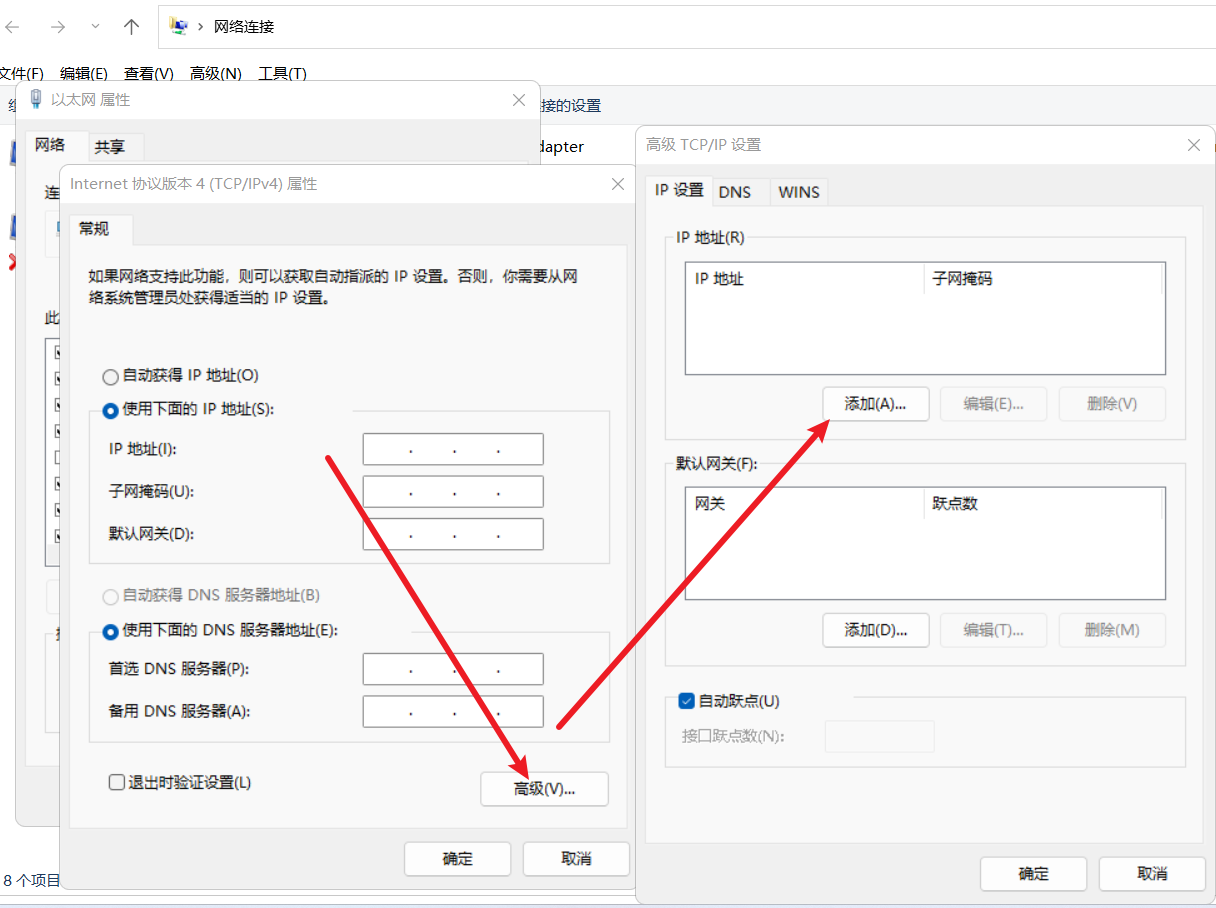
DNAT, SNAT, and Static Routes
SNAT
Scenario: a VM host in the cloud acts as a client and accesses an external server. vm(client)--->SNAT(convert the internal source IP in the packet to an external IP)--->Internet(server)--->SNAT(convert the destination IP in the packet to an internal IP)--->vm(client)
DNAT
Scenario: a VM host in the cloud acts as a server and provides services to external clients. Internet(client user)--->DNAT(convert the public destination IP in the packet to the internal destination IP)--->VM(server)--->DNAT(convert the internal source IP in the packet to an external IP)--->Internet(client user)
# DNAT
iptables -t nat -A PREROUTING -d 172.18.0.107 -p tcp --dport=80 -j DNAT --to-destination 192.168.25.106:8000
# SNAT
iptables -t nat -A POSTROUTING -s 192.168.25.0/24 -j SNAT --to-source 172.18.0.10
Static route:
A static route is a fixed route manually configured by an administrator on a router. Pay attention to the following when configuring static routes.
(1) A destination IP is required.
(2) The IP address of the next router interface directly connected to the static route, or the local interface of the static route, is required.
(3) Static routes are manually set by administrators and do not change unless an administrator intervenes.
Characteristics of static routes:
(1) They allow precise control over routing behavior.
(2) Static routes are unidirectional.
(3) The disadvantage of static routes is lack of flexibility.
Reference: https://www.linuxidc.com/Linux/2019-08/160377.htm
Configuring Linux IP Addresses (CentOS/Ubuntu)
# centos7.6
vi /etc/sysconfig/network-scripts/ifcfg-ens32

bootproto=static
onboot=yes

# Add several lines at the end: IP address, subnet mask, gateway, and DNS servers.
IPADDR=192.168.1.160
NETMASK=255.255.255.0
GATEWAY=192.168.1.1
DNS1=119.29.29.29
DNS2=8.8.8.8

# Restart the network.
systemctl restart network# ubuntu20.04
sudo vi /etc/netplan/00-installer-config.yaml
network:
ethernets:
ens33:
addresses: [192.168.31.215/24] # Static IP address and mask
dhcp4: no # Disable DHCP. Use yes if DHCP is needed.
optional: true
gateway4: 192.168.31.1 # Gateway address
nameservers:
addresses: [192.168.31.1,114.114.114.114] # DNS server addresses
version: 2
renderer: networkd # Backend: systemd-networkd or NetworkManager. Default is systemd-networkd if omitted.
# Apply the new configuration.
sudo netplan applyWireshark Packet Capture and Common Filter Syntax
- IP filters
# Filter by source address.
ip.src == 192.168.0.1
# Filter by destination address.
ip.dst == 192.168.0.1
# Filter by source or destination address.
ip.addr == 192.168.0.1
# To exclude the packets above, wrap the expression in parentheses and use "!".
!(ip.addr == 192.168.0.1)- Protocol filters
# Capture packets of a specific protocol. Enter the protocol name in lowercase.
http
# Capture packets from multiple protocols.
http or telnet
# Exclude packets from a protocol.
not arp or !tcp- Port filters (depending on the transport protocol)
# Capture packets on a specific port, using TCP as an example.
tcp.port == 80
# Capture packets across ports. Use and to connect expressions. The example below captures UDP packets above a certain port.
udp.port >= 2048- Length and content filters
# Length filters. The length here refers to the data segment length.
udp.length < 20
http.content_length <=30
# URI content filters. The keyword after matches is case-insensitive.
http.request.uri matches "user" (the requested URI contains the keyword "user")
http.request.uri contains "User" (the requested URI contains the keyword "User")
Note: the keyword after contains is case-sensitive.- HTTP request filter examples
# Filter requests whose request address contains "user", excluding the domain name.
http.request.uri contains "User"
# Exact domain filter.
http.host==baidu.com
# Fuzzy domain filter.
http.host contains "baidu"
# Filter request content_type.
http.content_type =="text/html"
# Filter HTTP request method.
http.request.method=="POST"
# Filter TCP port.
tcp.port==80
http && tcp.port==80 or tcp.port==5566
# Filter HTTP response status code.
http.response.code==302
# Filter HTTP packets containing a specific cookie.
http.cookie contains "userid"
Text Processing
Common Word formatting, common Excel formulas such as vlookup, and batch string processing with Notepad++.
Common Word Formatting
This is straightforward enough, so I will not expand on it here.
Common Excel Formulas (VLOOKUP)
Microsoft's official tutorial:
Batch String Processing in Notepad++ (Most Operations Depend on Regex)
- Add content at the beginning or end of a line.
The regular expressions ^ and $ represent the beginning and end of a line. Replace them with the content you want to add to insert specified content before or after each line.
- Delete odd or even lines.
The core idea is to match every two lines, group them, and replace them with the desired group. The regular expression is ^([^\n]*)\n([^\n]*), which matches from the beginning: non-newline characters + newline + non-newline characters. That is exactly two lines. Replace with \1 to keep odd lines, or \2 to keep even lines.
- Convert camelCase to snake_case.
Find a lowercase letter plus uppercase letter combination, insert _ in the middle, and convert the following letter to lowercase: ckcSEC becomes ckc_sec.
# Search
([a-z])([A-Z])
# Replace
\1_\l\2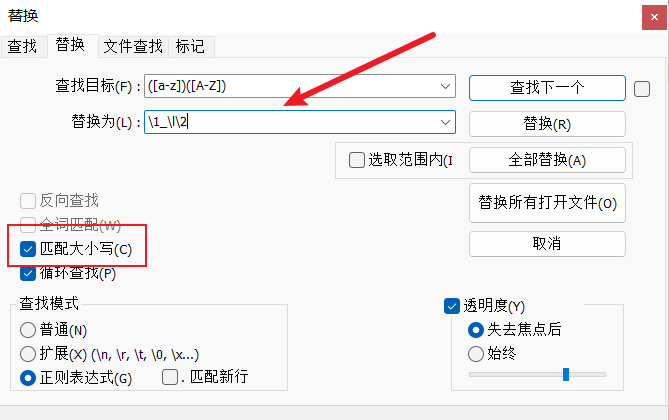
- Convert snake_case to camelCase.
Find a lowercase letter + _ + lowercase letter combination, remove _, and convert the following lowercase letter to uppercase: ckc_sec becomes ckcSEC.
# Search
([a-z])_([a-z])
# Replace
\1\u\2- Sometimes copied text has blank lines, tabs, or spaces at the end.
a. Remove trailing spaces and blank lines.
Search target: \s+$  Replace with empty. Select regular expression search mode.

b. Remove leading spaces.
Search target: ^\s+  Replace with empty. Select regular expression search mode.

c. Merge lines.
Search target: \r\n  Replace with empty. Select regular expression search mode.

d. Insert at the beginning of each line.
Search target: ^  Replace with the character to insert. Select regular expression search mode.

e. Insert at the end of each line.
Search target: $  Replace with the character to insert. Select regular expression search mode.
Programming Languages
Be able to use them at a basic level and modify scripts found online, such as Python or Linux shell scripts.
This cannot be learned in a day or two, so I will not expand on it here. It depends on consistent study and practice.
Tools
Network Access Tools
Tools such as V2Ray are often necessary for cybersecurity professionals. I will not explain too much here. Be sure to use them within the bounds of national laws and regulations, and do not commit illegal acts. They should be used only for learning, communication, and contributing to national cybersecurity.
Productivity
Online Note Software
This can be used directly for blogging. Writing blogs is a good habit because it helps you summarize and accumulate knowledge points in time, and it records your growth process. Besides building a personal blog site, you can also use software for note-taking. This helps with automatic cloud backup. I recommend Youdao Cloud Notes here. The free 3 GB cloud backup space is more than enough for notes.
Everything
Everything is a private, free Windows desktop search engine. It can quickly find files and directories by name on NTFS volumes, much faster than Windows' built-in search. It is very useful and highly recommended. It is convenient for quickly launching penetration testing tools or scripts and finding files.
https://www.voidtools.com/zh-cn/
Ditto
Ditto is a free and open-source clipboard enhancement tool for Windows. It supports mainstream systems, supports Chinese, and provides a portable version. Use it normally by copying content, then press `Ctrl+`` (the key before number 1) to open its interface. It records all copied history and allows selective pasting, which is very convenient.
https://ditto-cp.sourceforge.io/
Notepad++
There is not much to say about this tool. It is excellent.
https://notepad-plus-plus.org/downloads/
SSH Tools (MobaXterm, Xshell, etc.)
SSH tools. FinalShell is a domestic tool, but because of the typical concerns around domestic software, I am not very confident using it yet. Let it mature for a few more years.
Xshell is paid software, but there is a school edition that can be applied for free. The features are basically the same.
https://www.netsarang.com/zh/free-for-home-school/
MobaXterm is foreign, open-source, and free. It supports many protocols and is excellent. I have been using it for a long time.
https://mobaxterm.mobatek.net/
PHP Runtime Environment
This is mainly used for building personal practice ranges.
Examples include phpstudy with multi-version switching support, Wamp, ThinkPHP, and similar environments.
Cloud Drive (Team Data Sharing and Backup)
Aliyun Drive is fast and free.
Diagramming Software
draw.io
A practical free flowchart drawing tool. It aims to be completely open-source, free, and high-quality. It can easily create diagrams and is suitable for business, engineering, electrical, network design, software design, and many other professional drawing scenarios.
XMind (Mind Mapping Software)
Search for a portable cracked version yourself.
Browser Extensions
Hack-Tools
http://github.com/LasCC/Hack-Tools
s7ck HackTools is a web extension that makes web application penetration testing easier, including XSS, reverse shells, encoding conversion, and more. With the extension, there is no need to search different websites or local payload stores; most tools are available with one-click access.
HackBar
A useful tool for SQL injection.
User-Agent Switcher
Used to change the UA header.
FoxyProxy
A proxy tool for packet capture.
Wappalyzer
A well-known fingerprinting extension in the industry. No need to say more.
Security Products
Vulnerability Scanners
Every company has its own dedicated vulnerability scanner. Because company secrets are involved, I will not disclose details here.
Firewalls
Almost every security vendor develops its own firewall appliance.
A firewall is a network security device used to monitor inbound and outbound network traffic. Based on a defined set of security rules, it decides whether to allow or block specific traffic.
A firewall is a protective barrier built at the interface between internal and external networks, or between private and public networks, using a combination of software and hardware devices. It is a concrete way to obtain security. It combines computer hardware and software to establish a security gateway between the Internet and an intranet, protecting the internal network from illegal user intrusion. A firewall mainly consists of service access rules, verification tools, packet filtering, and application gateways.
Intrusion Detection IDS / Intrusion Prevention IPS
An IDS (Intrusion Detection System) professionally means monitoring the operation of networks and systems according to a security policy, detecting attack attempts, attack behavior, or attack results as much as possible, and ensuring the confidentiality, integrity, and availability of network system resources. Unlike a firewall, an IDS is an out-of-band monitoring device. It is not connected inline on any link and does not require traffic to flow through it to work. Therefore, the only deployment requirement is that the IDS should be connected to the links where all traffic of interest must pass.
In switched networks, IDS placement is generally chosen as close as possible to the attack source and as close as possible to the protected resources.
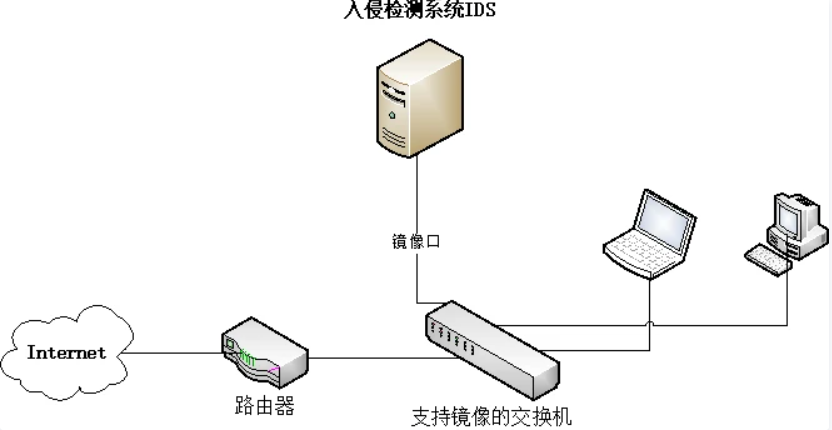
An IPS (Intrusion Prevention System) adds prevention capabilities on top of intrusion detection. Once a network attack is discovered, it can immediately take defensive measures according to the threat level of the attack.
IPS technology can deeply inspect and detect passing data traffic. It can drop malicious packets to block attacks and rate-limit abusive packets to protect network bandwidth resources. For IPS deployed on the data forwarding path, each packet can be deeply inspected according to predefined security policies, including protocol analysis and tracking, signature matching, traffic statistical analysis, event correlation analysis, and more. If a network attack hidden in the traffic is discovered, defensive measures can be taken immediately according to the attack's threat level. These measures include, in order of severity: alerting the management center, dropping the packet, terminating the application session, and terminating the TCP connection.
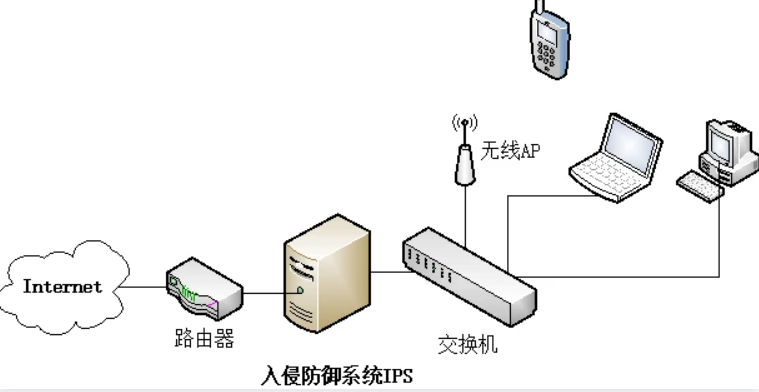
Differences between the two:
Different functions: IPS implements protection functions on top of intrusion detection.
Different real-time requirements: IPS must analyze real-time data, while IDS can perform post-event analysis based on historical data.
Different deployment methods: IDS is usually deployed out-of-band through port mirroring, while IPS is usually deployed inline.
References:
http://security.zhiding.cn/security_zone/2009/0412/1362627.shtml
https://cloud.tencent.com/developer/news/561338
Log Auditing
A comprehensive log audit platform centrally collects information such as system security events, user access records, system operation logs, and system running status from information systems. After normalization, filtering, merging, alert analysis, and other processing, it stores and manages logs centrally in a unified format. Combined with rich log statistics, summaries, and correlation analysis functions, it enables comprehensive auditing of information system logs.
Through a log audit system, enterprise administrators can understand the operating status of the entire IT system at any time and discover abnormal system events promptly. On the other hand, through post-event analysis and rich reporting, administrators can conduct targeted security audits of information systems conveniently and efficiently. When special security incidents or system failures occur, the log audit system can help administrators quickly locate faults and provide objective evidence for tracing and recovery.
Deployment methods for log audit platforms:
Hardware product deployment:
In general, a log audit system can be deployed out-of-band as long as it can communicate with all devices.
Single-node and distributed deployment are supported.
Cloud log audit deployment:
Cloud log audit deployment generally requires communication with devices across the whole network.
Reference: https://blog.csdn.net/qq_38265137/article/details/106790419
Bastion Host
A bastion host uses various technical methods to monitor and record operations performed by operations personnel on servers, network devices, security devices, databases, and other devices inside the network, so alerts, handling, and audit accountability can be centralized.
Cloud WAF
Cloud WAF means web application firewall in cloud mode.
Cloud WAF is the cloud model of a web application firewall. In this model, users do not need to install software WAF or deploy hardware WAF inside their own network to protect websites. Traditional WAF capabilities such as SQL injection prevention, XSS prevention, CC attack prevention, webshell upload prevention, tamper prevention, and hotlink prevention are also available in cloud WAF. From the user's perspective, cloud WAF is a security service.
APT / Situational Awareness
APT Attacks
APT Attack Technology Learning Guide
Situational Awareness
A major vendor's situational awareness product was bought out for fifty million.
Based on the characteristics and harm of APT attacks, big-data processing architecture, behavior analysis, virtual execution, multidimensional correlation analysis, machine learning, and other technologies are used to deeply detect and analyze 0-day/N-day vulnerabilities, specialized trojans, penetration techniques, and other methods widely used in APT attacks. The system mines and identifies known and unknown advanced threats in cyberspace, tracks and locates threats, and combines attack event correlation with trojan reports, trend analysis reports, and multiple visual statistical charts. This enables full-lifecycle detection, analysis, and early warning for APT attacks, helping users understand cybersecurity risk status comprehensively and intuitively. It can also integrate with Topsec firewalls to establish an APT monitoring and blocking defense system, forming a closed loop for attack defense.
Threat situational awareness monitors intrusion implantation events and internal compromise events, enabling real-time monitoring and situational awareness of known and unknown threats. It displays the overall cybersecurity situational awareness map in real time, helps grasp global asset risk, supports overall security strategy, and makes security visible, controllable, and predictable.
Macro threat situational awareness maps, multi-stage full-chain attack detection, static and dynamic technical detection, dynamic sandbox identification of unknown threats, comprehensive trojan communication behavior detection, and multiple sandbox escape countermeasures.
Antivirus Software
Enterprise antivirus software is centrally deployed and managed. Well-known products in the industry include QiAnXin and 360.
Incident Response
- Handle server infection incidents and manually remove simple malware.
This mainly means mining malware. Search for cleanup experiences from experienced practitioners, analyze them, and summarize the process.
Analyze web logs and operating system logs for intrusion tracing.
Write incident response reports.
Common commands.
ifconfig, cd, cat, grep, ping, traceroute, find, netstat, chmod, ps, top, whoami, head, tail, last, lastb
- Common Windows tools.
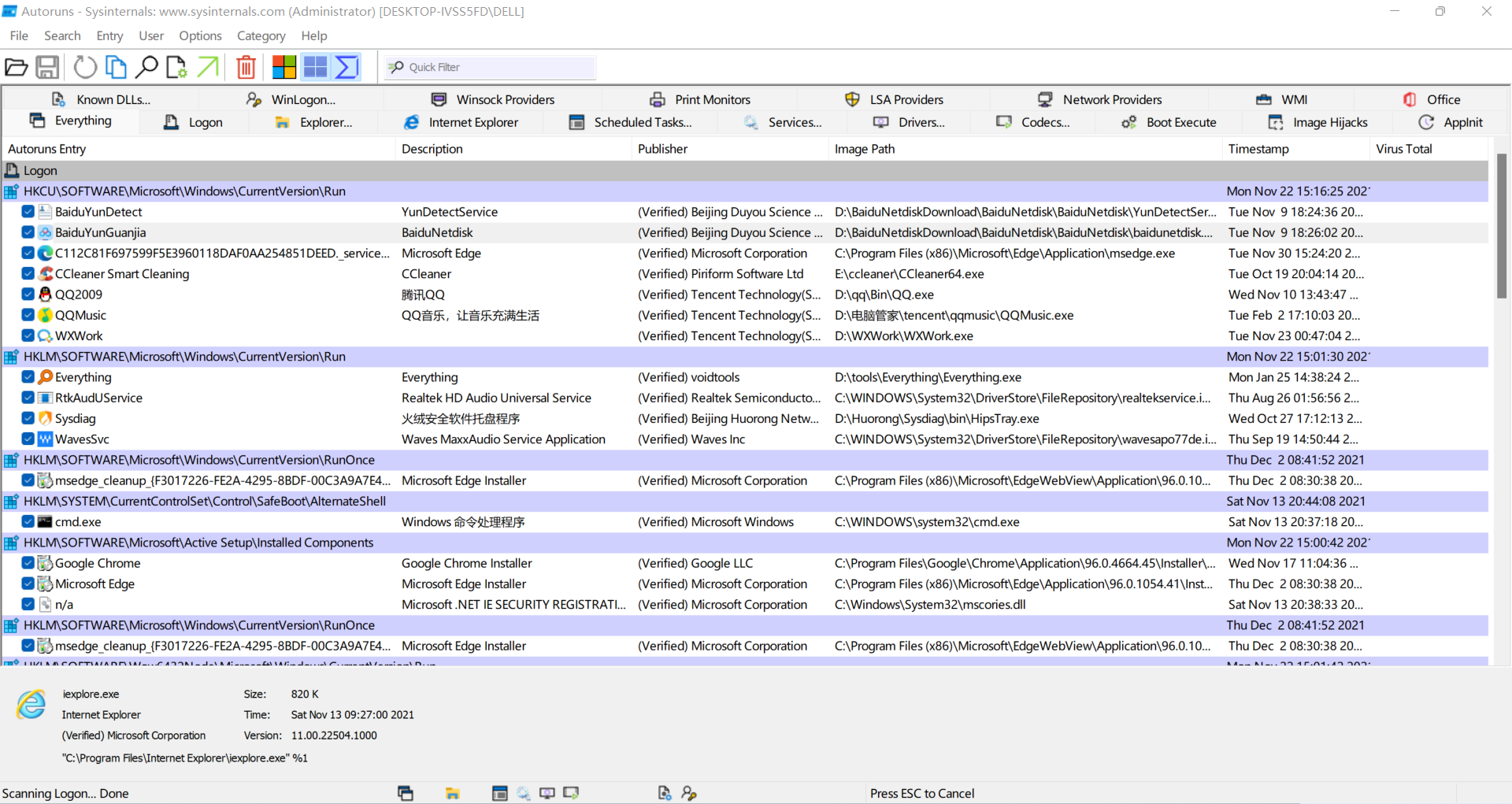
An enhanced startup task manager. Autoruns is a very simple, easy-to-use, and commonly used tool in the Sysinternals suite. It is one of the tools I use most frequently. Its main function is helping manage various Windows startup items. With it, you can stop relying on so-called system management or security assistant tools for startup item management.
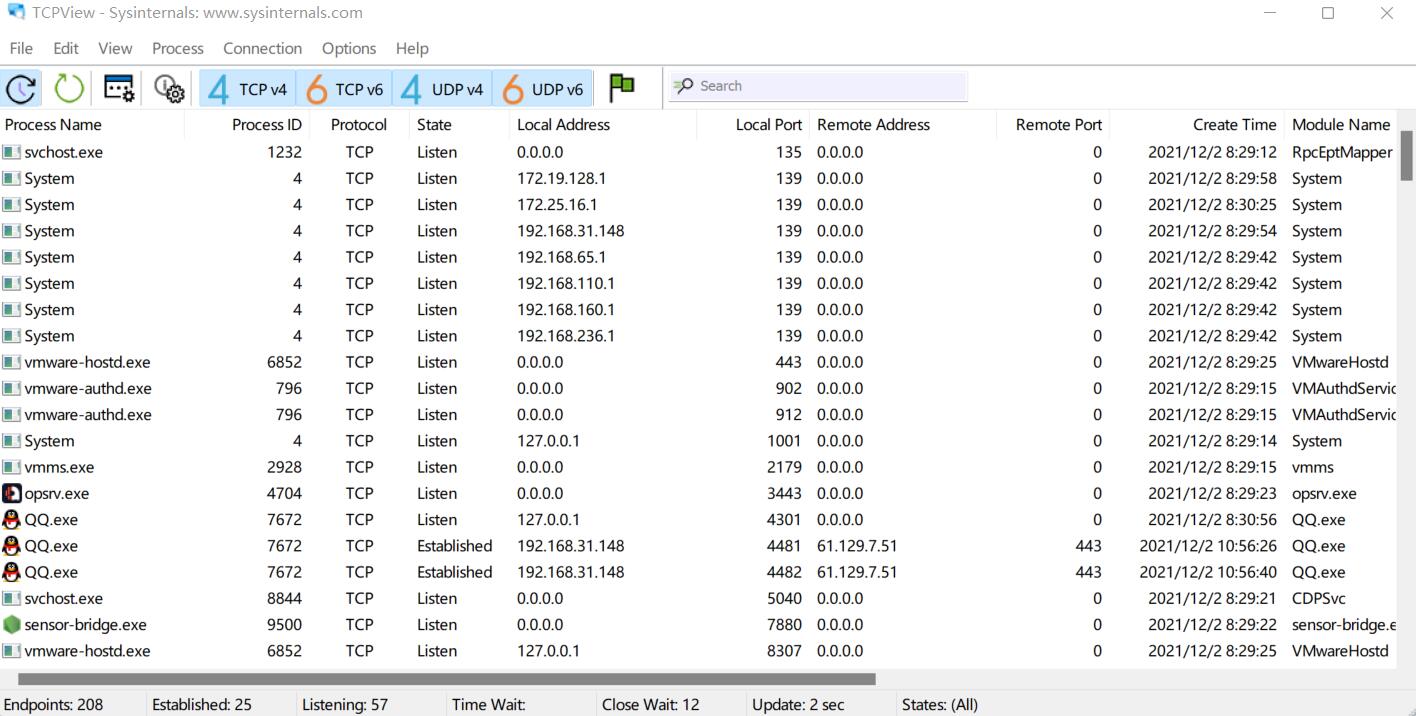
It displays a detailed list of all TCP and UDP endpoints on the system, including local and remote addresses and TCP connection states. On Windows Server 2008, Vista, and XP, TCPView also reports the name of the process that owns the endpoint. TCPView provides a more informative and convenient subset of the Netstat program included with Windows.
Process Explorer shows information about which handles and DLLs processes have opened or loaded. It has two subwindows. The top window always displays a list of currently active processes, including the names of their owning accounts, while the information shown in the bottom window depends on the selected mode:
Handle mode: you will see handles opened by the process selected in the top window.
DLL mode: you will see DLLs and memory-mapped files loaded by the process.
Process Explorer also has powerful search capabilities, quickly showing which processes have opened a specific handle or loaded a DLL. Its unique functions make it useful for tracking DLL version problems or handle leaks, and for understanding how Windows and applications work.

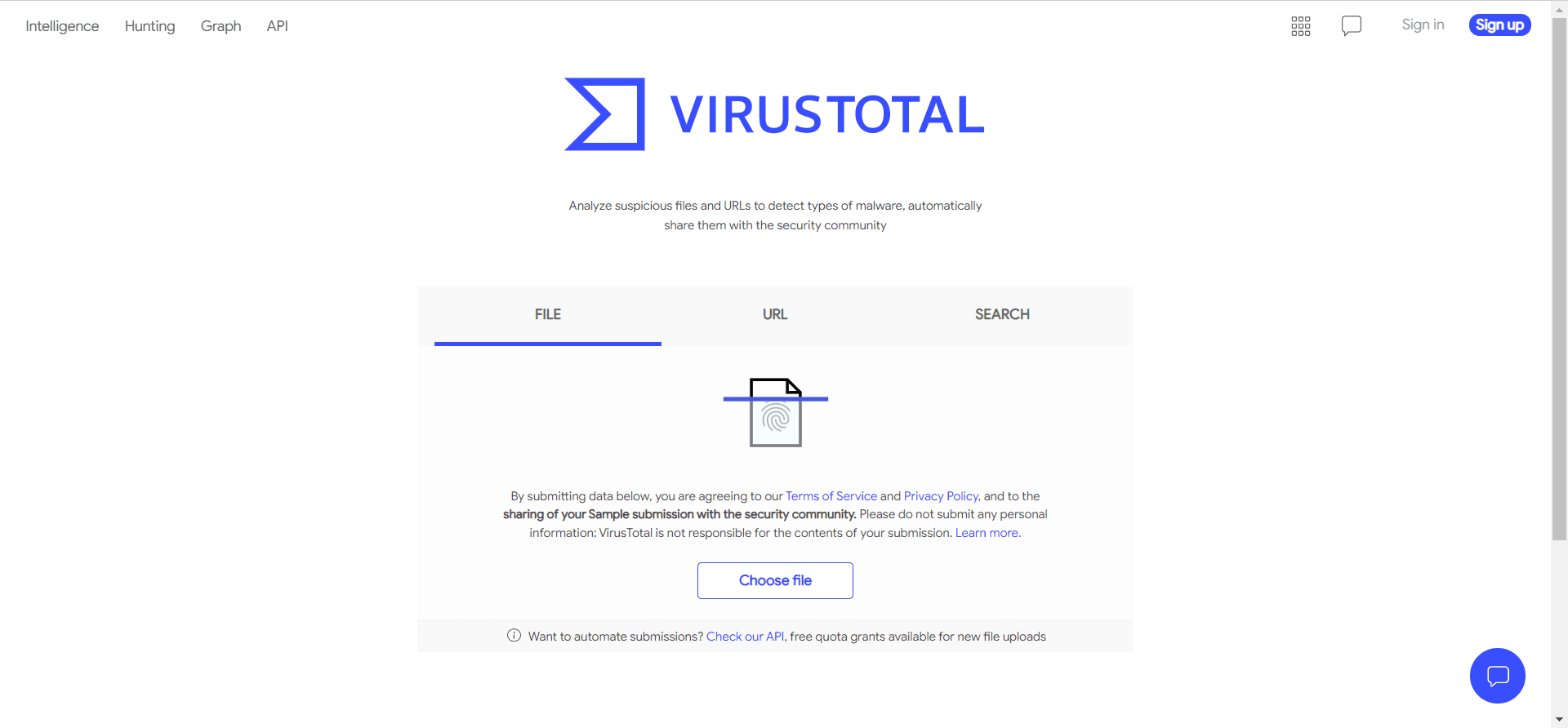
It can analyze suspicious files and URLs to detect malware types and can also be used for antivirus evasion testing.
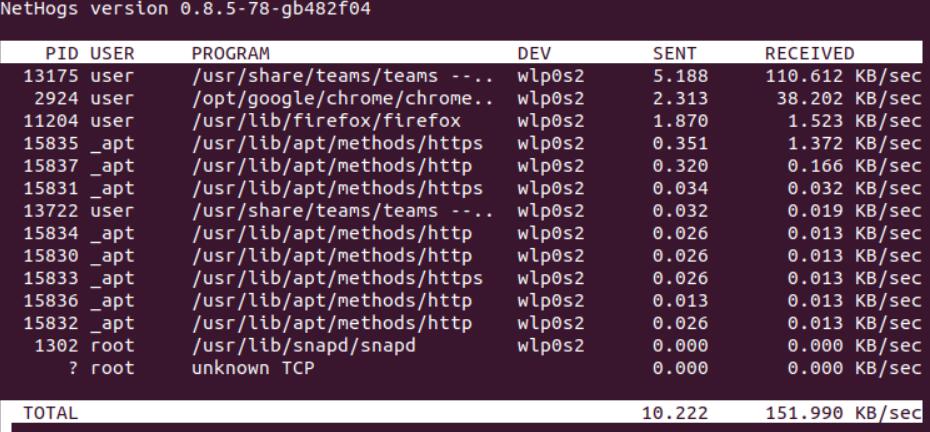
- Common Linux tools: NetHogs and iftop.
NetHogs is a small "network top" tool. Unlike most tools, it does not break traffic down by protocol or subnet; instead, it groups bandwidth by process.
iftop is used to view network traffic, including real-time rate, total traffic, average traffic, and more. It is a real-time traffic monitoring tool.
Security Hardening
- Windows
Check Windows services, processes, startup items, group policy, patching, firewall, and so on.
- Linux
Password policies, scheduled tasks, umask, SSH, users with uid=0, and similar checks. Use existing scripts where appropriate.
- Databases and middleware
There are too many security hardening knowledge points. For details, refer to my article Security Hardening Manual.
Penetration Testing
As a security service engineer, penetration testing capability is definitely required.
Be able to independently perform penetration testing on web systems and write penetration testing reports.
Internal network penetration testing.
Be able to do simple app penetration testing, capture app network interaction packets, and understand the basics. Tool: Fiddler.
I have written many previous articles about penetration testing. You can refer to them for learning.
- Use various tools, including Nmap, sqlmap, Burp Suite, Metasploit, and Cobalt Strike.
Nmap
Nmap tutorial: https://wiki.ckcsec.cn/en/web/tools/Nmap%E7%9A%84%E4%BD%BF%E7%94%A8.html
sqlmap
sqlmap tutorial: https://wiki.ckcsec.cn/en/web/tools/Sqlmap%E7%9A%84%E4%BD%BF%E7%94%A8.html
Burp Suite
Detailed BP installation tutorial
BP penetration testing tutorial
CobaltStrike4.0
CobaltStrike4.0 installation and deployment
CobaltStrike4.0 penetration testing manual (PDF)
- Be familiar with the principles and fixes for OWASP Top 10 vulnerabilities.
Vulnerability Scanning
Be able to use Nessus.
Be able to organize Nessus vulnerability scan reports.
Be able to interpret vulnerability scan reports and guide users through remediation.
Be able to independently perform vulnerability scanning onsite for users.
CTF
I am still a beginner in this area and only treat it as a hobby. Here are some CTF practice ranges.
CTFHub: an out-of-the-box CTF learning solution.
https://www.ctfhub.com/#/index
Gongfang World: adworld.xctf.org.cn
WgpSec CTF: ctf.wgpsec.org
BUUCTF: buuoj.cn
Final Notes
The essential skills for security service engineers are summarized above. Some parts may be lightweight, but they still took time to organize. The goal is to give beginners entering security a high-level view, a direction, and goals for learning and improvement. Let's keep improving together.